Free Wedding Seating Chart Maker
Import your guest list, drag guests onto tables, and export a print-ready PDF for your caterer — in one browser tab, with no account.
Free up to 40 guests · No account · PDF & PNG export included
More than 40 guests? One-time $19.99 Event Pass. No subscription, ever.
How many guests are you seating?
Start free and seat your first 40 guests. Past guest 40 you add the one-time $19.99 Event Pass — no subscription, and you decide after you have seen it work.
Start free, decide at 40 →How SeatCanvas Works
Import Your Guest List
Upload a CSV from Excel or Google Sheets, or add guests manually. Names, dietary needs, and table preferences come in automatically. See how CSV import works.
Arrange Tables on Your Canvas
Drag guests onto round or rectangular tables. Rearrange instantly — no spreadsheet cells to resize, no formatting to fight. More on the drag-and-drop seating planner.
Export & Share Your Seating Chart
Download a print-ready PDF with your full guest list and table assignments, or export a high-resolution PNG of your canvas layout. Share directly with your venue coordinator, caterer, or wedding planner. See export options.
See exactly what your caterer gets
This is a real export from a 200-guest chart — every table, every guest, in the order the room is set. Open it before you build anything.
Download the 200-guest sample PDF →No email, no account. PDF and PNG are both on the free plan.
Built for a 300-Guest Wedding
✓ 300+ guests on one canvasMy wife and I had over 300 guests. Large families on both sides, plus friends from every stage of life. I wanted a spreadsheet. She wanted a big sheet of paper. Honestly, both were terrible — you couldn’t rearrange anything, share it, or see the whole picture at a glance. So I built SeatCanvas. It worked so well for our own wedding that I kept going.
— Jaime, founder of SeatCanvas · Read the full story
SeatCanvas vs. Other Seating Chart Methods
Spreadsheets work until you need to move 40 people. Paper works until someone cancels. Here’s how they stack up.
| Feature | Spreadsheet | Paper / Whiteboard | Canva template | SeatCanvas |
|---|---|---|---|---|
| Visual table layout | ||||
| Drag a guest from one table to another | ||||
| CSV guest list import | ||||
| Print-ready PDF export | ||||
| Per-table capacity limits | ||||
| Stays a live layout, not a picture | ||||
| Free tier available |
Everything You Need for Your Wedding Seating Chart
Drag-and-Drop Builder
Move guests between tables with a drag. No spreadsheet cells to resize, no formatting to fight — seat your entire wedding party in minutes, not hours.
Round & Rectangular Tables
Set round banquet tables, long rectangular tables, or mix both to match your venue floor plan. Assign per-table guest limits so you’ll know immediately if any table is overbooked.
PDF & PNG Export
Export your layout as a PDF for your caterer and a high-res PNG to share with your venue coordinator and wedding planner. Both formats included on the free plan.
Let AI seat your guests
Smart Seat is the AI seating assistant inside SeatCanvas. Sort your guest list three ways, choose a few seating rules, and it fills every table for you.
- Group guests by relationship, age and vibe, with box-select and bulk drag
- Households always sit together, and keep-apart pairs stay apart or get flagged
- No tables yet? It builds the layout, then you shuffle, undo or drag anyone by hand
With a free account you preview the seating with up to 40 guests named. The Event Pass seats every guest.
See how Smart Seat works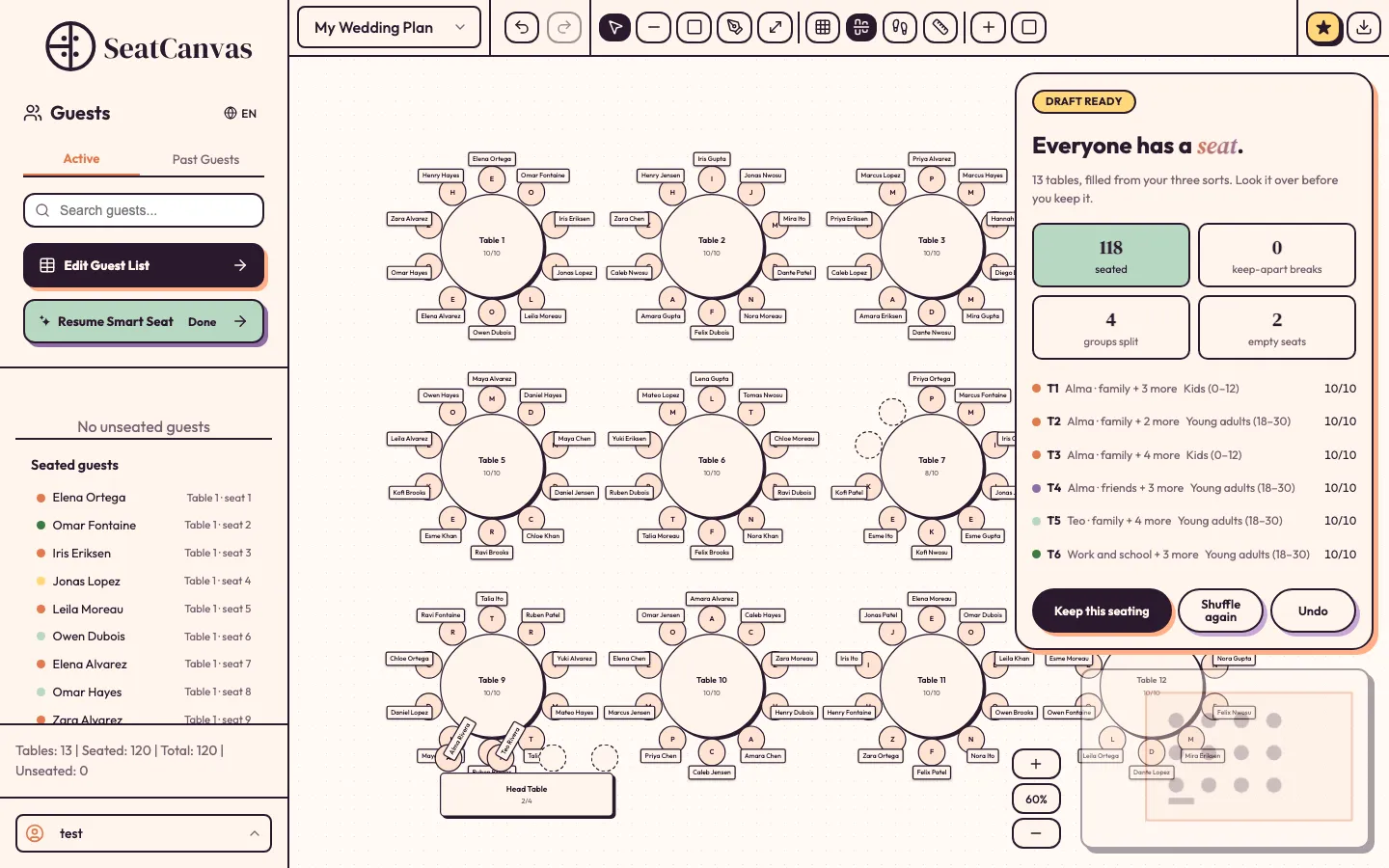
Ready-Made Table Layouts You Can Edit
Start from a ready-made table layout instead of a blank page. Pick a round-table reception, a long banquet run, or a mix of both, then drag your own guests onto it, rename the tables, and move anything that does not fit your venue. Each layout stays live and editable, not a picture, so you can keep changing it until the seating is final. SeatCanvas is built to handle the unexpected changes as RSVPs arrive.
Virtual Wedding Seating Chart — Plan From Anywhere
Planning a wedding across two cities — or two countries — shouldn’t mean emailing spreadsheets back and forth until someone loses track of the latest version. SeatCanvas is an interactive seating chart maker that runs entirely in your browser — an online seating chart maker with nothing to install, no account needed to start, and no files to sync.
A virtual seating chart gives you the freedom to plan from anywhere. Open a tab, import your guest list, drag people to tables. That’s it.
Your guest list stays on your device until you export. No cloud storage, no account required to start. The chart is yours.
When one partner is in Dallas and the other’s mother is in Monterrey, a shared PDF from your virtual seating chart replaces a dozen email threads about who sits where.
Build the layout on a laptop at the kitchen table or a tablet during the venue walkthrough — the canvas works the same either way.
Simple, Fair Pricing
Start free. Upgrade only when you need unlimited guests — one-time payment, no subscription. Compare free seating chart tools.
Free Seating Chart Plan
- Seat up to 40 guests
- Smart Seat AI seating preview
- Full canvas & drag-and-drop tools
- PDF & PNG exports
Event Pass
- Unlimited guest seating
- Smart Seat seats every guest
- All exports (PDF, PNG, CSV)
- Valid until 30 days after event
- 7-day refund guarantee
Wedding Seating Chart Tips
How to Group Guests by Relationship
Start with family, then close friends, then colleagues and acquaintances — grouping by shared connections reduces awkward small talk. Keep the couple’s immediate families near the head table so they feel included without being on display. Guests who know each other from different parts of your life often mix better than expected when seated together rather than scattered. Use the free seating chart planner to test groupings before committing — it takes seconds to rearrange.
How Many Guests Fit Per Table?
Round tables typically seat 8–10 guests comfortably; going above 10 makes conversation harder across the table. Rectangular banquet tables seat 6–8 per side depending on chair width and tablecloth overhang. Always confirm exact dimensions with your venue — a 60-inch round and a 72-inch round have very different capacities. SeatCanvas is built for any event size — from intimate gatherings up to 300+ guests — and lets you set per-table capacity so you’ll know immediately if any table is overbooked. For a full walkthrough, see the guide on how to create a wedding seating chart.
When to Finalize Your Seating Chart
Most couples finalize 1–2 weeks before the wedding, after the last RSVP deadline has passed. Leave at least 3 days for last-minute changes — someone always cancels, and plus-ones get added later than they should. Once the chart is final, export a PDF immediately. Send copies to your caterer, venue coordinator, and a backup contact who’ll be on-site. If your catering contract lists a meal choice per guest, add a notes column before exporting — it saves a call the morning of. Venue coordinators genuinely appreciate a printed copy with table numbers highlighted; whoever is running the room needs their own copy. If you’ve been filling in The Knot’s printable seating chart templates by hand, the Knot seating chart breakdown shows what changes when you can drag guests into seats — SeatCanvas supports more table shapes and exports directly to PDF. Coming from AllSeated (now Prismm)? Here’s the structured comparison. See full pricing and free plan details before upgrading.
Frequently Asked Questions
Is SeatCanvas free for wedding seating charts?
Yes. The free tier lets you seat up to 40 guests with PDF and PNG export, no credit card required.
How do I create a wedding seating chart with SeatCanvas?
Import your guest list via CSV or add guests manually, drag and drop them onto round or rectangular tables, then export as PDF or PNG to share with your caterer or venue. See the complete wedding seating chart guide for a full walkthrough.
Can I use SeatCanvas as a wedding seating chart generator?
Yes. Smart Seat, the AI seating assistant built into SeatCanvas, drafts the seating for you. It pre-sorts what it can from the side and relationship on your guest list, you adjust the groups, and it seats every table while keeping each household together. You can still move anyone by hand afterwards. If you want to brainstorm in a chat assistant first, read our guide to AI seating chart generators.
What's the difference between the free plan and the Event Pass?
The free plan seats up to 40 guests and includes a Smart Seat preview: the AI seating assistant drafts your whole seating chart and shows up to 40 guests by name. The $19.99 one-time Event Pass unlocks unlimited guest seating and lets Smart Seat seat every guest for real, with no subscription.
How do I import my wedding guest list into SeatCanvas?
Export your spreadsheet as a CSV file, upload it into SeatCanvas, and the tool maps your columns automatically — names, dietary needs, table preferences. Guests appear in the sidebar ready to drag onto tables.
Does SeatCanvas work on mobile?
SeatCanvas is a web app that works in any browser. For the best experience when building your chart, a desktop or tablet is recommended.
Can I use SeatCanvas as a virtual seating chart for my wedding?
Yes. SeatCanvas runs entirely in your browser — no app to download, no account needed to start. Import your guest list, arrange tables with drag and drop, and share the exported PDF with anyone helping coordinate, wherever they are.
Is there a template for wedding seating charts?
Yes. Our seating chart layout examples give you ready-made table layouts to start from, plus a free guest-list starter for Excel or CSV that imports straight into SeatCanvas. Open a layout in the planner, add your guests, and keep editing until the seating is final.
Ready to seat the room?
Most couples finalize 1–2 weeks out, after the last RSVP. Start now and keep changing it until then.
Free up to 40 guests · No account · PDF & PNG export included
made w/ ♡