
Spreadsheets ruin weddings.
Staring at 150 names, trying to keep families together while separating cousins who haven’t spoken since 2019, is a miserable exercise in negotiation. It pulls the joy right out of event planning. (If you prefer the hands-on approach, check out our step-by-step wedding seating chart guide.)
So people outsource it. They turn to ChatGPT or Claude.
An AI seating chart generator sounds like magic. It handles the math, and it prevents you from accidentally seating 11 people at an 8-person table.
But asking an AI to solve your seating chart only works if you give it the right constraints.
Can AI Actually Generate a Seating Chart?
Yes.
A seating chart is a rigid constraint satisfaction puzzle. Large Language Models excel at this exact type of sorting.
Instead of dragging names around for three hours, you hand the AI your rules. It processes the families. It enforces your boundaries. It flags the bad history between relatives. It balances the tables.
But you have to tell it exactly what you need.
How to Prompt an AI Seating Chart Generator
Try SeatCanvas — Free
Build your seating chart visually. Import guests, drag to tables, export a print-ready PDF.
Start Planning Free →Dropping a raw list of names into Claude gets you nowhere. You have to define the venue.
Copy and paste this exact prompt:
Prompt: “Act as a professional event planner. I am providing my guest list in CSV format below. The room has 12 round tables that seat 8 people each, and 4 rectangular tables that seat 10 each.
Generate a seating chart that strictly follows these rules:
- Keep guests with the same ‘Invite ID’ or ‘Family Name’ at the same table.
- Group the ‘Bride Side’ together; do the same for the ‘Groom Side’.
- Do not seat Aunt Sarah and Uncle Mike at the same table.
- Do not exceed maximum capacity for any table.
Return the final arrangement as a structured list by Table Number.”
Hit enter. The AI does the heavy lifting. The math is done.
The Example AI Output
Within seconds, the AI seating chart generator will produce something like this:
Table 1 (8/8) - Bride Family
- John Smith (Invite 101)
- Mary Smith (Invite 101)
- Robert Davis (Invite 102)
- Linda Davis (Invite 102)
- …and so on.
It groups your guests logically, respects the sides, and prevents structural errors. Instead of losing an afternoon to table Tetris, you get a clean, actionable baseline.
Handling Edge Cases & AI Hallucinations
AI is powerful, but it isn’t perfect. When acting as an AI seating chart generator, ChatGPT and Claude can sometimes break constraints if the math is highly irregular or if the prompt is poorly constructed.
Here are the most common edge cases and how to fix them:
- The Phantom Guest: Sometimes, AI will invent a guest to “balance” a table. Always double-check the final AI headcount against your original CSV.
- The “Close Enough” Constraint Break: If you have exceptionally large families and too few tables to accommodate them, the AI might quietly seat Aunt Sarah and Uncle Mike together, assuming the capacity constraint was more important than the interpersonal one.
- Uneven Tables: If you have 118 guests and 15 tables of 8, the AI might create 14 tables of 8 and 1 table of 6. If you want a more even spread (e.g., tables of 7 or 8), you must explicitly state: “Distribute guests evenly across all tables, ensuring no table has fewer than 7 guests.”
- The “Plus One” Parsing Error: AI sometimes merges a primary guest and their unnamed “Guest” into one impossible entity. Explicitly instruct the model to treat “Jane Doe” and “Jane Doe’s Guest” as two distinct seats taking up physical space.
When you review the AI output, treat it as a strong first draft.
Bridging the Gap: The Problem with Text
Here is where the AI fails.
ChatGPT gives you a text document. You cannot hand a text document to a caterer. You cannot look at a bulleted list and see if Table 4 blocks the exit, or if the DJ speakers will deafen Grandma at Table 12.
Text lists do not show you how a room flows. You need a visual canvas. For weddings, our wedding seating chart maker picks up where the AI output ends.
Smart Features That Finish the Job
You used AI to solve who sits with who. Now you need a visual tool to decide where they go.
SeatCanvas takes over where ChatGPT stops. We built our architecture to absorb structured imports perfectly.
Effortless CSV Import
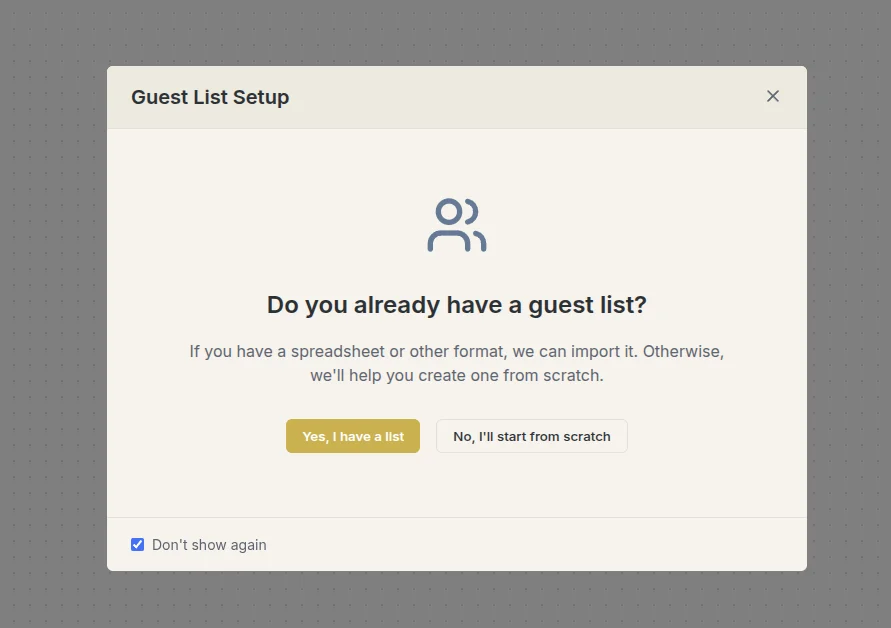
Take the exact list the AI generated and drop it into SeatCanvas. The import wizard reads your fields. It sees the Invite ID, the Side, the Relationship, and the RSVP Status. The data structure you just built survives the transfer.
Auto-Grouping by Relationship
SeatCanvas reads the Relationship tags and instantly bundles families in the sidebar.
Drag a group onto the digital floor plan. The logic keeps them together. You don’t hunt for individual names. The system treats a family as a single unit, exactly as the AI planned.
Smart Conflict Detection
AI hallucinates. Guests cancel. Things change.
Our Collision Creator acts as a guardrail. Mark two guests as incompatible inside SeatCanvas. If you accidentally drag them to the same table during a last-minute reshuffle, the canvas flags it immediately. You avoid the drama before the invitations even mail.
Ready to Visualize Your Smart Seating?
Don’t let a text chat be your final plan. Take the logic from the AI, drop it onto an infinite visual canvas, and see exactly how your room works. When you’re done, export print-ready PDFs for your venue and caterer.
Start building your seating chart on SeatCanvas today—no account required. Setup takes five minutes.
Frequently Asked Questions
Which AI is best for generating seating charts? Both ChatGPT (specifically GPT-4o) and Claude (Sonnet 3.5 or Opus) excel at logical constraints. Claude tends to follow rigid, multi-step instructions slightly better when dealing with very large lists (200+ guests), while ChatGPT is often faster and formats the output more intuitively.
What format should my guest list be in? A clean CSV or plain text list works best. The AI struggles with messy PDFs or screen snippets. Provide columns for Name, Relationship, Side, and Table Preference before you run the prompt.
Can AI plan a wedding layout? No. An AI seating chart generator can handle the logic of who sits with whom (guest grouping), but it cannot design a physical floor plan. It doesn’t know where the dance floor, pillars, or kitchen doors are. You will always need a visual canvas like SeatCanvas to map the AI’s logic to your actual venue space.
Is it safe to put my guest list into ChatGPT? If you are concerned about privacy, avoid pasting personal contact information (emails, phone numbers, addresses). A seating chart only requires names and grouping tags (like “Bride Side” or “Family ID”). This is sufficient for the AI to do its job without compromising sensitive data.
✦ Google Preferred Source
Want to see more SeatCanvas stories on Google?
You can ask Google to show SeatCanvas more often in your own Top Stories and supported Google experiences. This personalizes your account; it does not raise SeatCanvas for everyone.
Google's control loads only after you choose Continue with Google.