

A 60-guest wedding is a puzzle. A 200-guest wedding is a project.
Past 150 people, the spreadsheet stops being a planning tool and starts being a hostage situation. RSVPs trickle in the wrong week. The caterer wants meal counts by table. Your aunt’s plus-one was a maybe and is now a definite. The venue coordinator emails about pillars. And you still have not placed grandparents.
This is where most “free” seating chart tools quietly fall off the cliff. They were built for 30-person dinner parties and dressed up to look like wedding software. At scale, they break.
Here is what actually works for 200+ guests, why most tools struggle past 150, and the short list worth your weekend.
The short version: For a 200-guest wedding you need three things from a seating chart maker — CSV/Excel import so you don’t retype the list, a real visual canvas that matches your venue, and exports the caterer can actually use. SeatCanvas does all three. The free tier seats 40, the Event Pass is a one-time $19.99 for unlimited guests. Skip anything that caps tables, hides exports behind a subscription, or makes you start from a template.
What 200+ guests actually changes
Scale is not the same problem as size. A bigger wedding does not just mean more rows in a spreadsheet — it means more failure modes.
Edit volume goes up. A 60-guest chart settles after maybe a dozen swaps. At 200 guests, you are making 50+ edits across three weeks of trickling RSVPs. Tools that require you to rebuild the layout when one person drops out are a tax on your time.
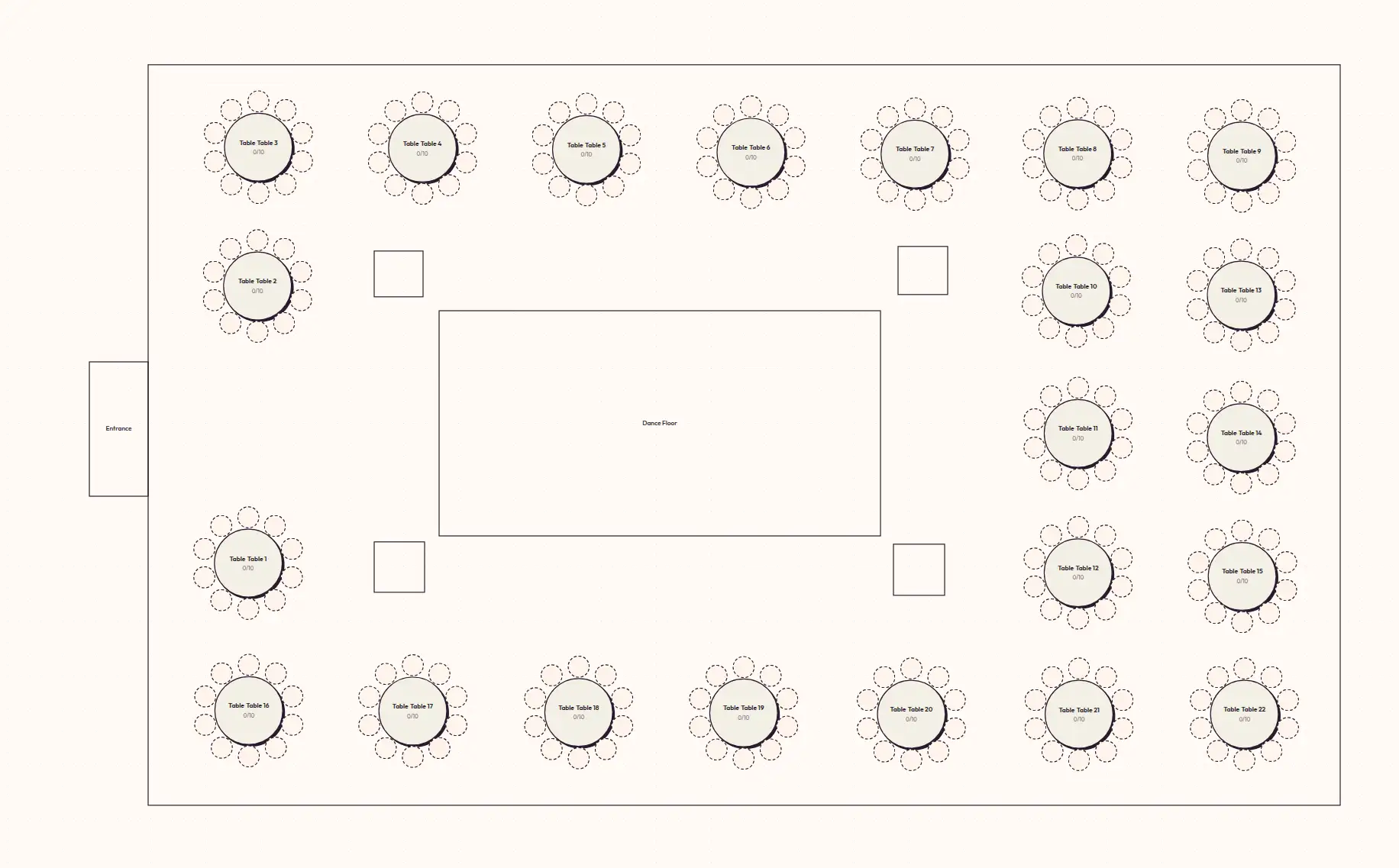
Geometry stops being optional. With 60 guests at 6 tables, “we’ll figure out the layout at the venue” is fine. With 200 guests at 22 tables, two pillars and a bar position can quietly destroy your floor plan if you didn’t plan against the actual room.
Vendor handoffs multiply. The caterer wants meal counts by table. The venue wants a layout PDF. The day-of coordinator wants escort card data. The photographer wants to know where the head table is. Five exports, five formats, often in the same week.
Family politics scale faster than the guest list. Divorced parents, feuding cousins, the friend group that broke up in October — every additional 50 guests adds at least one new constraint you have to seat around.
The right tool is the one that absorbs that volume without making you start over.
What to look for in a seating chart maker for large weddings
Try SeatCanvas — Free
Build your seating chart visually. Import guests, drag to tables, export a print-ready PDF.
Start Planning Free →Most tool comparisons read like feature checklists. For 200+ guests, only four things actually matter.
CSV or Excel import that survives messy spreadsheets
If your guest list lives in Excel — which, for almost every couple I’ve seen, it does — retyping 200 names is a non-starter. The tool needs to ingest your sheet, map your columns to its fields, and not gag on the empty rows or the “+1?” column you forgot to clean.
SeatCanvas has a CSV/Excel guest list import that runs through a wizard: pick the sheet, match the columns, confirm, done. Plus-ones come through. Notes come through. Table preferences, if you tracked them, come through.
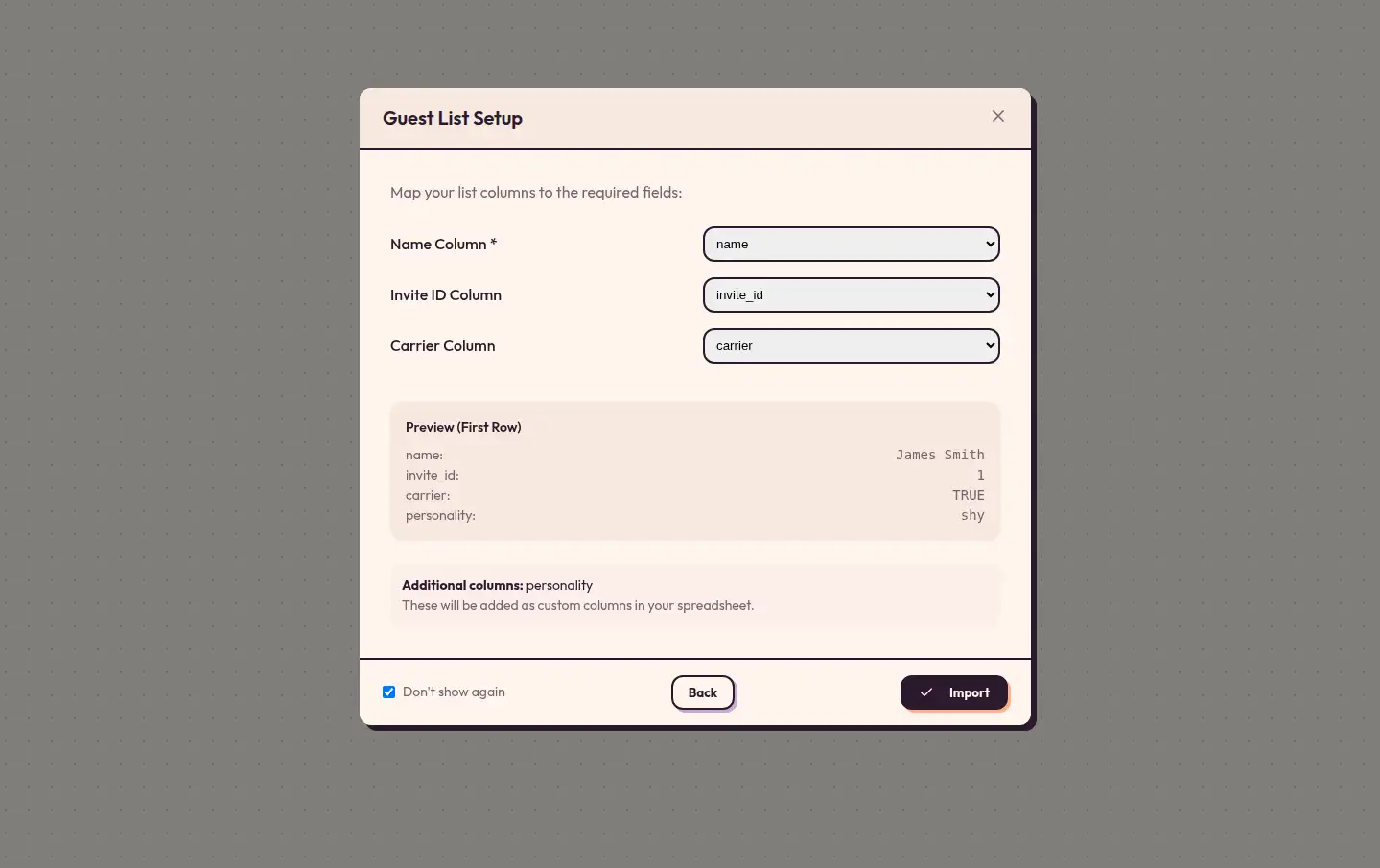
The test for any import flow: can you go from “my Knot RSVP export” to “names on the canvas” without a copy-paste? If not, skip the tool.
A visual canvas that matches the actual room
Spreadsheets are great for inventory. They are terrible for spatial reasoning. At 22 tables you cannot hold the whole room in your head — you need to see it.
A real canvas means you can:
- Place tables in the actual positions they’ll occupy at the venue
- Mix round and rectangular shapes in one layout
- Move a whole table without losing its guests
- See sightlines to the dance floor and head table at a glance
Drag-and-drop on a real floor plan is what separates a planning tool from a fancy text editor with rectangles.
Exports the caterer will actually open
PDF for the venue. PNG for the printed escort card display. CSV for the caterer who only opens spreadsheets. Maybe one more PDF for the day-of coordinator with a different annotation.
High-quality exports sound trivial until your venue rejects a screenshot at 4 PM the day before the wedding. Print-ready PDFs at the right page size are the difference between “we got it, see you Saturday” and a phone call you do not want to make.
Edits that don’t punish you
The single most underrated feature in any large-wedding tool is fast undo and instant table swaps. You will move guests fifty times. If each move takes two clicks and a confirmation modal, you have already lost the afternoon.
Open the planner with a 50-guest test list and try moving people around for ten minutes. If it feels slow at 50, it will feel impossible at 200.
The short list for 200+ guest weddings
These are the tools couples actually end up using at this scale, ranked by how well they hold up.
SeatCanvas
Best for: couples planning anything from 100 to 600+ guests who want a tool that scales without turning into venue-coordinator software.
SeatCanvas was built around the wedding-and-banquet use case. The canvas is infinite, so a 200-person wedding and a 50-person rehearsal dinner work the same way — same drag, same exports, same import wizard.
The pricing model fits this audience. Free tier seats 40 guests, which is enough to test the workflow with a partial RSVP list before committing. Once you outgrow it, the Event Pass is a one-time $19.99 that removes the cap entirely. No subscription. No annual renewal you forget about. One wedding, one charge.
The honest limitation: SeatCanvas is a single-event tool, not a venue-wide ops platform. If you are running 14 weddings a year as a venue, you want a multi-event system. If you are planning your wedding, you want SeatCanvas.
If your guest list lives in The Knot, Zola, or a similar planner, the export-then-import path is straightforward — no retyping. Zola’s own chart caps its free tier at 15 guests — at 200 you outgrew it before you started; the Zola seating chart alternative has the numbers.
AllSeated / Prismm
Best for: venues, planners, and couples whose planner already lives inside this ecosystem.
AllSeated (now Prismm) is genuinely capable. 3D walkthroughs, vendor coordination, the full enterprise stack. The tradeoff is weight. Logging in feels like opening a venue management dashboard, because that is what it is.
If you are a couple planning one wedding without a planner who already uses it, the learning curve is real. Capable software and usable software are not the same thing.
Social Tables
Best for: corporate event planners and venues with recurring layouts.
Social Tables is solid for what it does and clearly aimed at the professional event-management market. Pricing reflects that — it is not built around a single-couple, one-time purchase. For most 200-guest weddings, the price-to-value ratio favors a wedding-specific tool.
WeddingWire / The Knot seating tools
Best for: couples already deep in one of these ecosystems who want to keep guest management in one place.
The all-in-one platforms include seating features because they have to, not because seating is their main craft. At 60 guests, they do the job. At 200, the limits start showing — table count caps, export quality, edit speed. If your seating chart is the most complex part of your planning, a dedicated tool will hold up better. The WeddingWire seating chart comparison runs WeddingWire’s tool in detail.
Canva, Google Slides, PowerPoint
Best for: nothing at this scale.
I include these because people genuinely try. They are design tools, not planning tools. At 200 guests, you are essentially building a CRM out of text boxes. The tool will let you. You will regret it by the third RSVP change.
If you want a longer breakdown of these, see the free seating chart maker comparison.
How to actually build a 200-guest chart in an afternoon
Once you have the right tool, the work itself is not that bad. Most couples I’ve watched do this finish a usable first draft in under three hours.
1. Get the room geometry right first. Before names, before tables — get the floor plan. Where is the dance floor, the bar, the DJ, the head table? Sketch the boundaries and any obstacles (pillars, low ceilings, columns). Most venues will email you a CAD file or a marked-up PDF if you ask. While the floor plan is open, size the bar too — my alcohol calculator for a wedding this size turns 200 guests and a five-hour reception into a bottle count.
2. Drop your tables in their final positions. For 200 guests, you are likely working with 20–22 tables of 10, or 25 tables of 8. Place them around the dance floor with realistic spacing — about 5 feet between table edges so chairs and servers fit. Get the geometry sane before any names go down.
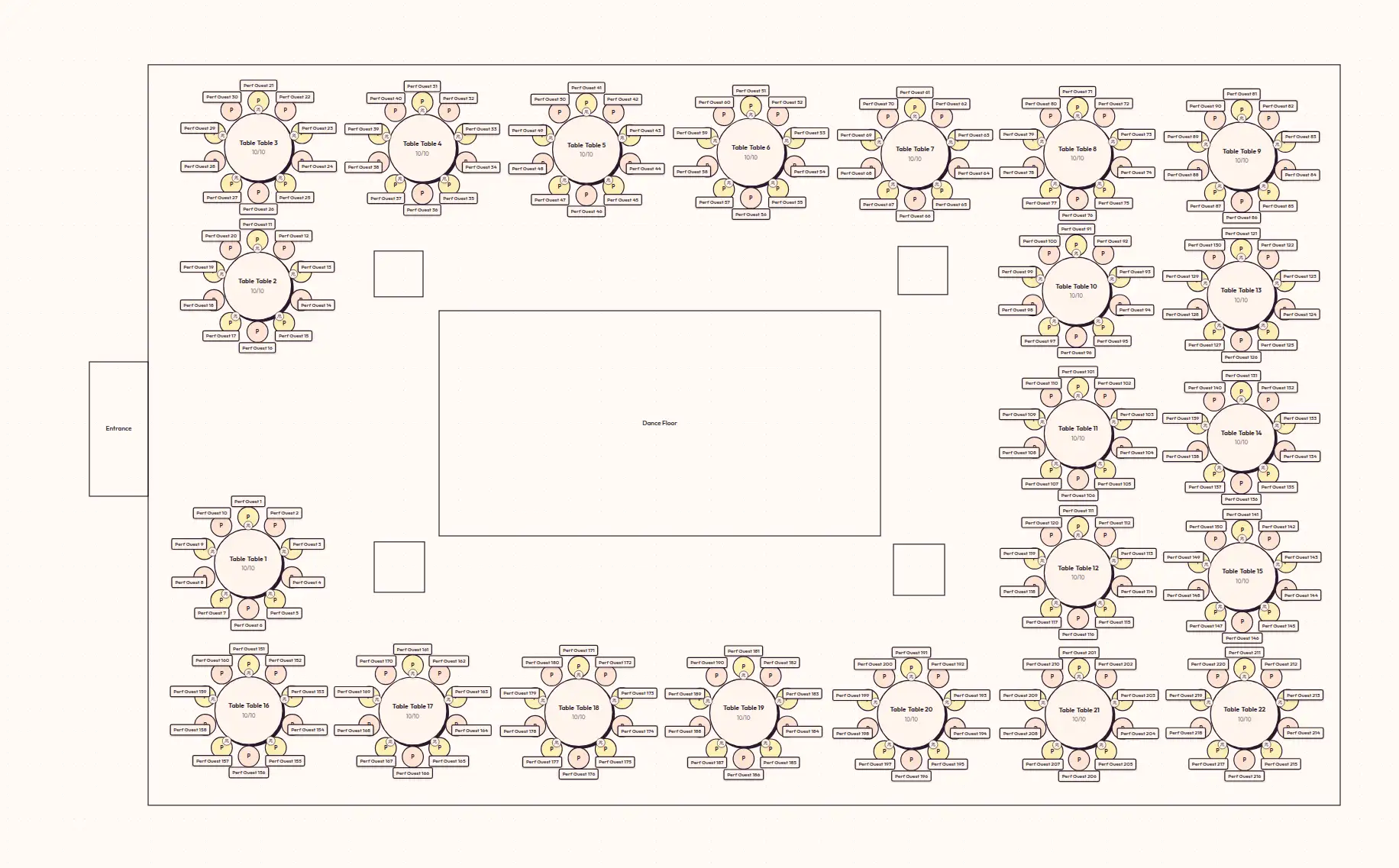
3. Import the guest list. Drop in your RSVP spreadsheet. The wizard handles the column mapping. Unconfirmed RSVPs go in a holding bucket — don’t waste time seating maybes.
4. Place VIP tables first. Sweetheart or head table, then both sets of parents, then grandparents. These positions cascade through the rest of the chart, so locking them in early prevents 40 minutes of rearranging later.
5. Seat by cluster, not by individual. College friends together. Work friends together. Family branches together. At 200 guests you do not have time to optimize at the individual level — group placement first, individual swaps after.
6. Test the chart with five guest perspectives. Walk through the layout as your aunt, your single college friend, your boss’s wife, the cousin nobody likes, and your grandmother. If any of them ends up at a table that feels like an afterthought, fix it now.
7. Leave slack. Two seats per 50 guests is the right buffer for 200+ weddings. Late RSVPs happen. Plus-ones materialize. A digital chart absorbs this. A printed paper chart does not.
For the full version of this process — including the parts that are not specific to large weddings — see the step-by-step wedding seating chart guide.
When the upgrade is genuinely worth paying for
The 40-guest free tier is real and useful for testing. It is not enough for an actual 200-person wedding. The honest math:
- You will exceed any free tier. Every serious tool caps the free version somewhere under 50 seated guests. This is true on SeatCanvas, AllSeated, and most competitors.
- The Event Pass at $19.99 is a one-time charge. Compared to a wedding budget, it is rounding error. Compared to subscription tools that can run $80 to $120 across a typical four-month wedding-planning window, the one-time pass is meaningfully cheaper the moment planning runs past the first month.
- The hidden cost of free is your time. Twenty hours of fighting a free tool’s 50-guest cap or watermark is twenty hours you do not get back. The math gets ugly fast.
This is the part nobody says out loud: at 200 guests, the question is not “can I avoid paying?” The question is “which tool will hurt the least when I’m doing this at 11 PM the Wednesday before the wedding?”
Common questions about large wedding seating charts
How many tables for 200 guests?
Round tables of 10: 20 tables plus a head/sweetheart table. Round tables of 8: 25 tables. Mixed configurations are fine — most large weddings end up with 18–22 round tables and one rectangular head table. Add one buffer table for late RSVPs and dietary clusters.
Can a free seating chart tool actually handle 200 guests?
No, not honestly. Free tiers cap somewhere between 30 and 50 guests because that’s the sweet spot for the small-event use case the tools were built around. You can sometimes work around the cap by splitting the wedding across multiple “events,” but the export and edit experience falls apart. Pay for the right tool — it’s $19.99 on SeatCanvas — and stop fighting the limit.
What’s the fastest way to build the chart?
Spreadsheet first, canvas second. Get the RSVP list clean in Excel. Import. Place tables to match the venue. Cluster guests by relationship. Save vendor exports last. Most couples do this in two to three sittings of an hour each, not one nine-hour weekend.
How do you handle late RSVPs?
Keep two seats per 50 guests open. Group your “maybe” pile in a holding row outside the main canvas — don’t seat them prematurely and force a rearrangement when they decline. Digital tools let you slot in late confirms with one drag instead of redrawing the whole chart.
Should every guest get a specific seat or just a table?
Table assignment is enough for most 200+ weddings. Escort cards direct guests to a table; place cards assign a specific chair. Pin specific seats only at the head table, the parents’ tables, and any table with a known accessibility need. Doing more than that for 200 guests is a planning sink with no real payoff.
A seating chart for a 200-guest wedding is not harder than a small one — it is just less forgiving. Tools that work fine for a dinner party expose every weakness at scale. The right tool absorbs the volume; the wrong tool punishes every edit.
If you want to see how it feels at scale, open SeatCanvas and import a partial RSVP list. Five minutes on a real canvas with twenty tables on it will tell you more than another hour comparing feature pages.
✦ Google Preferred Source
Want to see more SeatCanvas stories on Google?
You can ask Google to show SeatCanvas more often in your own Top Stories and supported Google experiences. This personalizes your account; it does not raise SeatCanvas for everyone.
Google's control loads only after you choose Continue with Google.