

Every wedding has a seating chart. Weddings with divorced parents have a seating diagram, a family map, and a quiet political document all at once.
The guest list is not the hard part. The hard part is which table the bride’s mother sits at, whether the groom’s father’s new wife counts as immediate family, who is allowed to be in the same line of sight as whom, and whether you can swap two people without dragging your aunt into a group text at midnight.
A good seating chart generator does not solve any of that emotionally. It does something more useful — it makes the layout cheap enough to change that you can try four versions before lunch.
Here is what actually works for couples seating divorced parents, what fails, and the boring tool-level details that make the difference.
The short version: For a wedding with divorced parents, you want a seating chart generator that lets you tag guests by family side, place two parent tables symmetrically near the head table, and re-export the layout in minutes when something changes. SeatCanvas handles all three. Free up to 40 seated guests, one-time $19.99 Event Pass beyond that. Skip anything that forces a single “parents” table, hides exports behind a subscription, or makes you redraw the room every time a stepparent confirms.
Why divorced-parent weddings break most seating tools
Most seating chart software is built around an assumption that the family is one block. Bride’s family on one side of the aisle, groom’s family on the other, two tidy clusters near the head table, done.
That assumption falls apart almost immediately in real life. The bride’s family is not one block. It is the bride’s mother and her current partner, the bride’s father and his current partner, sometimes the bride’s stepparent who raised her, sometimes grandparents who do not speak to one of the above, and a small fleet of half-siblings who have opinions about all of it.
The tools that struggle here share three traits:
- They treat the head table as fixed and the parent tables as auto-generated. Two parent tables, both labeled “parents,” both placed on the same side of the room. Useless for a divorced-parents wedding.
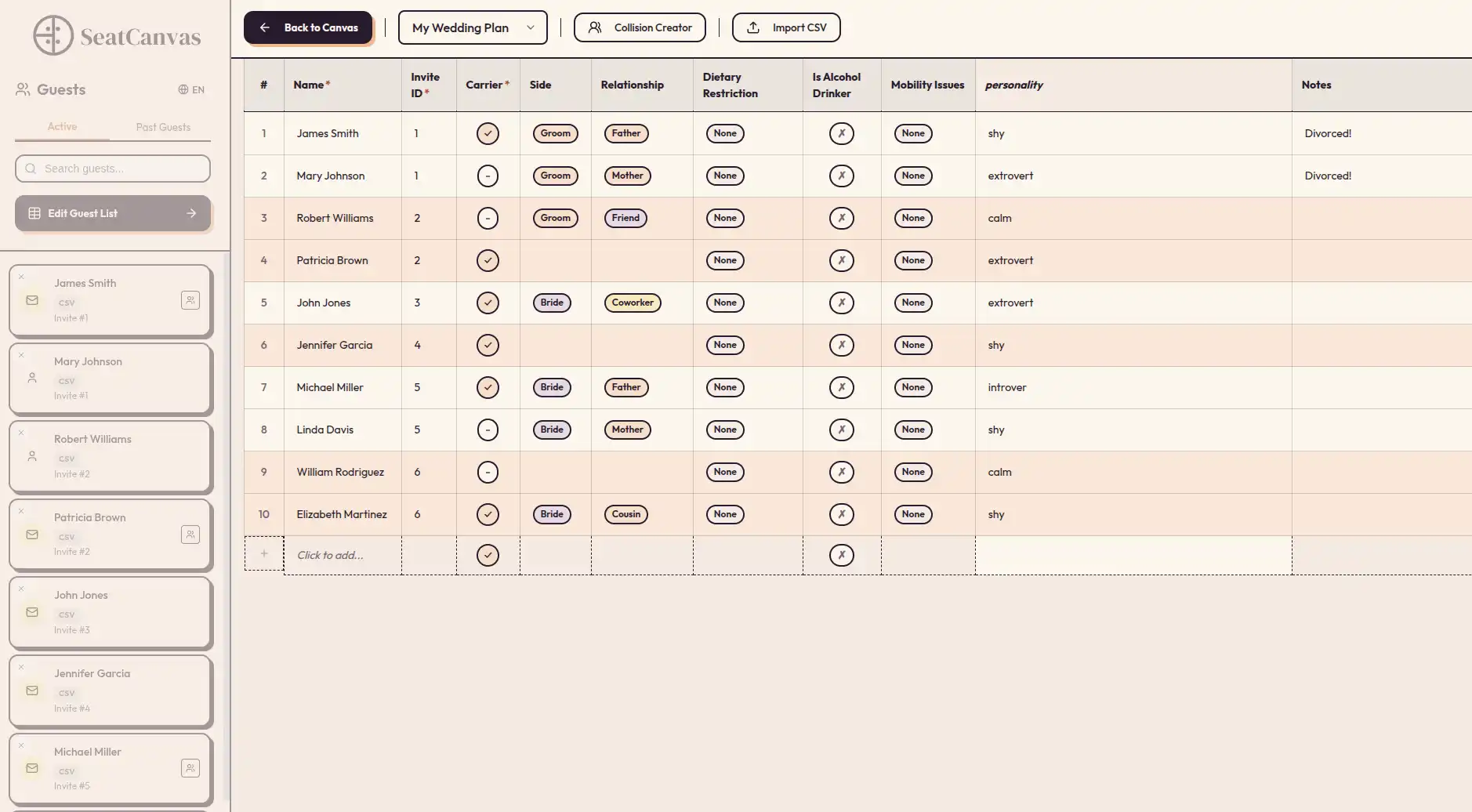
- They cannot tag guests by family side. If you cannot see at a glance which guests belong to which parent’s invite list, you cannot balance the room.
- They make table changes expensive. Moving one stepparent triggers a rebuild of the table. Moving a table triggers a rebuild of the layout.
A good generator inverts all three. The head table is one element you place. Parent tables are independent shapes you put wherever the geometry of the room needs them. Guests carry tags you can filter on. And nothing gets rebuilt when you swap two people.

The four-table pattern that works for divorced parents
Try SeatCanvas — Free
Build your seating chart visually. Import guests, drag to tables, export a print-ready PDF.
Start Planning Free →After watching enough of these charts settle, the same shape keeps emerging. Call it the four-table pattern.
Table 1: The head table or sweetheart table. Couple only, or couple plus wedding party. The center of the room, whatever that means in your venue.
Table 2: Parent A’s table. One divorced parent, their current partner, their side of the immediate family (siblings, grandparents), and one or two warm friends of the family who keep the conversation moving. Placed near the head table, on the side of the dance floor that matches their entrance.
Table 3: Parent B’s table. Mirror image. The other divorced parent, their current partner, their side of the immediate family, their warm friends. Placed symmetrically — same distance from the head table, opposite side of the dance floor.
Table 4: The buffer table. Stepfamily who do not fit cleanly in either parent’s table, half-siblings who want their own group, family friends who are close to both sides. Placed adjacent to the parent tables but with its own gravity.
The reason this works is symmetry. Two parent tables placed at equal distance from the couple reads as intentional. One parent table near the head and one parent table near the kitchen reads as a ranking, which is what divorced-parent couples spend the entire planning year trying to avoid.
The four-table pattern is the skeleton. Your specific family fills in the soft tissue.
What to look for in a seating chart generator for divorced parents
Most feature checklists are noise. For a wedding with divorced parents, only five things matter.
Guest tags by family side
You should be able to mark every guest with at least one tag — “bride mom side,” “bride dad side,” “groom mom side,” “groom dad side,” “couple’s friends,” “vendors.” When you place a table, the tags let you see whether the room is balanced or whether one side is quietly carrying three more rows than the other.
SeatCanvas does this through guest notes that import from your spreadsheet. If your CSV has a “Side” column, the CSV/Excel guest list import wizard preserves it. If it does not, you can add a notes column in two minutes and re-import.
Independent table shapes near the head
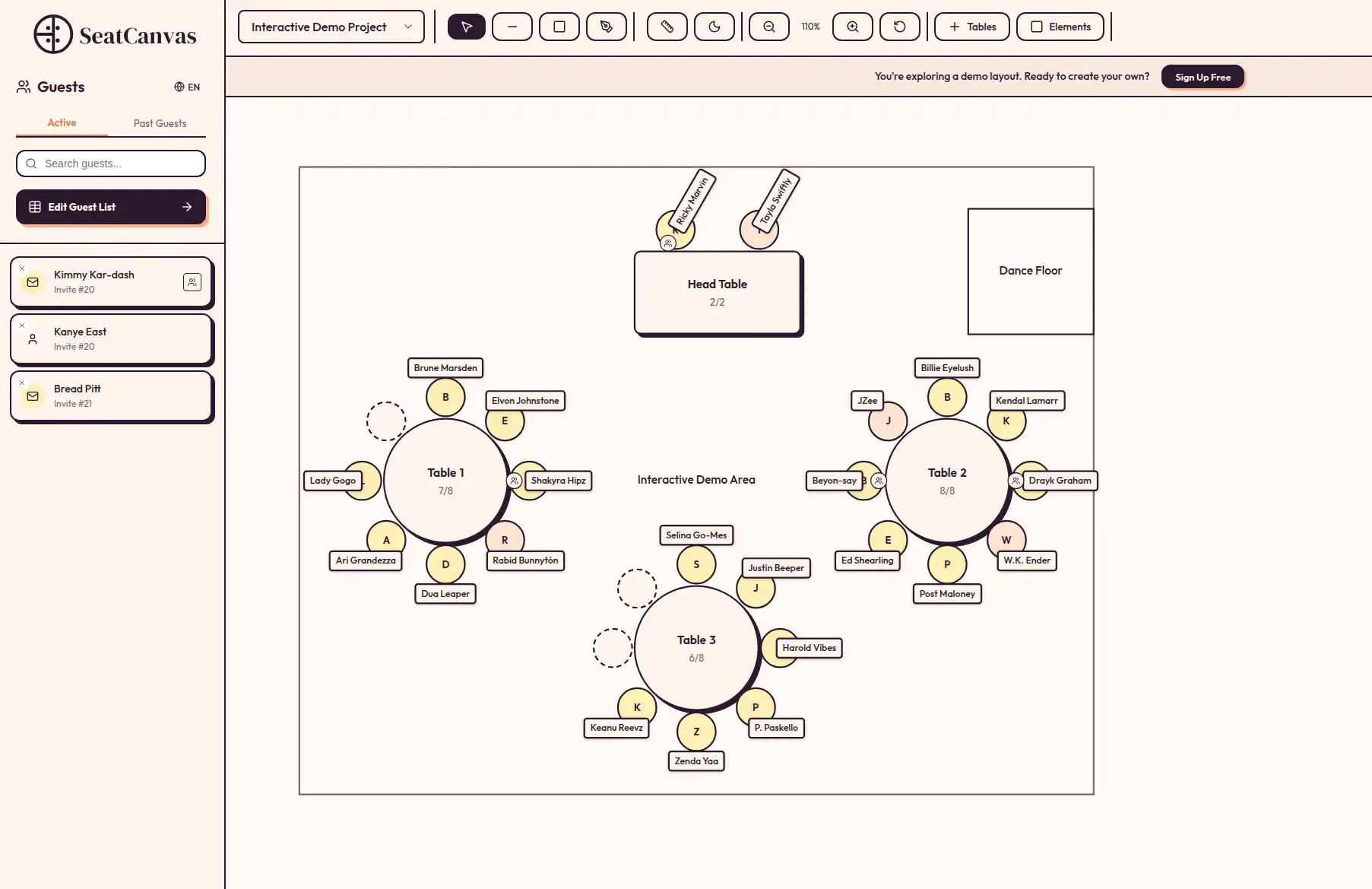
A real canvas. Round, rectangular, mixed. Place a sweetheart table at the front. Place Parent A’s table at front-left, Parent B’s table at front-right, both the same distance from the couple. Place the rest of the room around them.
Tools that force a “head table” template with auto-generated parent tables are working against the shape divorced-parent weddings actually need.
Move-whole-tables-without-loss
This sounds boring. It is the single most important feature for this audience.
Family politics shift across the planning window. Parent A says they would prefer not to be on the dance floor side. Parent B’s new partner asks to be seated facing the door rather than the wall. A late RSVP from a stepparent reshapes the table count. You will move tables. The tool that lets you move a table as one object, with all its assigned guests intact, is the one you will not curse at the week of the wedding.
Filtered views by family side
Once you have tagged guests, you should be able to view the canvas with one side dimmed. Show me only the bride’s father’s side. Show me only the friends of the family. The view tells you whether the room actually balances or whether you have unconsciously front-loaded one parent’s side.
Re-exports in minutes, not days
The seating chart for a divorced-parents wedding is going to change. Three times, four times, maybe seven. The tool that lets you export a fresh PDF in ninety seconds is the one that survives the planning window. Tools that require an export request through their support team are designed for vendors, not for the couple navigating a moving target.
High-quality PDF and PNG exports at print resolution are not a premium feature. For this kind of wedding they are the whole product.
What to skip
Some tooling shows up in search results for “wedding seating chart divorced parents” that does not actually help. The category is full of bait.
Skip these:
- Tools that auto-generate seating from the guest list. AI seating generators are great for a 22-person dinner party and useless for a 140-person wedding with two stepfamilies. Family dynamics are not in the training data. The auto-layout will seat your bride’s father next to her stepfather, and you will spend an hour undoing it.
- Tools that force a single “parents” table. Templates from generic wedding platforms often hard-code this. If the template assumes one parents table, the tool is the wrong shape for this wedding.
- Tools that hide PDF export behind a subscription. The chart is going to change. If every export costs another month of subscription, the bill compounds. A one-time pass or a real free tier are the only viable pricing structures here.
- Tools that do not let you tag guests. Without tags, you are managing 140 people in your head and on sticky notes. The tags exist for the moments you forget which side of the family the third cousin is on.
- Generic floor plan software. Architecture tools draw tables beautifully and assign guests terribly. You do not need CAD. You need a planner.
The Canva alternative breakdown covers why design-only tools fail at this in detail.
How to build the chart, step by step
If you are starting from scratch on a divorced-parents wedding, this is the order I would follow.
Step one: tag the guest list before you open the canvas. In your spreadsheet, add a “Side” column. Bride mom, bride dad, groom mom, groom dad, couple’s friends, vendors. Spend twenty minutes here. It saves three hours later.
Step two: place the head table or sweetheart table first. Center of the room or whatever the venue layout favors. Lock the position.
Step three: place the two parent tables symmetrically. Front-left and front-right of the head table, same distance, same shape. This is the visual statement that both parents matter equally. Do not skip the symmetry.
Step four: place the buffer table. Adjacent to the parent tables, slightly further back. This is where stepfamilies who do not fit either parent’s table land.
Step five: fill the parent tables from the inside out. Closest family first. Then current partner. Then warm friends of the family. Eight to ten seats per table. Resist the pressure to make every seat at the parent’s table a relative.
Step six: build the rest of the room without thinking about politics. Friends with friends, cousins with cousins, coworkers in their own corner. The room past row two is mostly about who will enjoy each other’s company.
Step seven: filter the view by family side and check the balance. Dim everyone who is not “bride dad side.” Look at the room. Is the dad’s side underrepresented? Add a friends-of-the-family table near him. Repeat for each parent.
Step eight: export, sleep on it, revise. The PDF that looks fine on Tuesday will reveal three problems on Wednesday. Export early, re-export often, and do not lock the chart until the RSVPs stop trickling.
What changes when there are stepparents who raised the couple
Sometimes the divorced parents are technically the parents, but the stepparent did the actual raising. The bride’s stepmother who came in when she was four and was at every soccer game. The groom’s stepfather who taught him to drive.
The seating chart should reflect who the parents are, not who the law says they are.
If a stepparent helped raise one of the couple, that stepparent belongs at the head-table-adjacent parent table, full stop. They sit next to their partner. They get the same visual placement as the biological parent. If the biological parent has been absent or estranged, the chart can quietly say so by not centering them.
This is the part of the seating chart that is genuinely emotional. A tool that lets you place tables independently — rather than forcing the template into “mom’s table, dad’s table” — gives you the room to make the chart match the actual family. Most couples I see making this kind of chart describe the experience as one of the most validating parts of the planning year.
When parents are remarried to each other’s friends (yes, really)
Occasionally the family is so blended that “parent A’s table” and “parent B’s table” overlap. Parent A is remarried to someone Parent B grew up with. There is a half-sibling who is technically related to both sides. A grandparent who keeps in touch with both ex-spouses.
In these cases, the four-table pattern still holds, but the rules of who goes where loosen. Two practical principles:
- Ask, do not assume. A ten-minute phone call with each parent during planning (“is there anyone you would rather not be seated near?”) will save you a week of guessing.
- Use the buffer table aggressively. The buffer table is where genuinely-blended guests land. Half-siblings who feel equally tied to both sides, family friends who are close to multiple parents, the cousin who maintains relationships across the whole map. Do not force them to pick a side.
The chart’s job is to make the room feel calm. Sometimes that means letting some of the family escape the binary.
A quick comparison of options for this wedding type
Five tools come up most often for couples planning a wedding with divorced parents. Here is how they actually behave at this kind of chart.
SeatCanvas
Best for: couples who want full control of table placement, tags by family side, and a tool that does not assume a tidy nuclear family.
Free up to 40 seated guests. One-time $19.99 Event Pass for unlimited. Independent table shapes, mixed round and rectangular, full canvas, full CSV import, full PDF/PNG/CSV export at every tier. No subscription that auto-renews three months past the wedding.
The honest limitation: SeatCanvas is built for one event at a time. If you are planning a wedding and a corporate offsite and a baby shower this year, that is three Event Passes. For most couples planning one wedding, that is exactly the right shape. For the offsite, the event seating plan generator walkthrough covers the corporate version of the same room.
The Knot, Zola, WeddingWire
Best for: couples already deep inside one of these planning ecosystems for everything else.
These platforms include seating tools because they have to. The seating tool is rarely the strongest piece. Templates tend to assume one head table, one parents table, and a checkbox for “stepfamily” that does not actually change the layout. See the Knot seating chart alternative writeup for the detailed comparison, or the WeddingWire seating chart comparison if that is where the rest of your planning lives.
Generic AI seating generators
Best for: small dinner parties, not weddings with complex family structures.
The promise is “tell us your constraints and we will seat the room.” The reality is that family politics do not compress into prompt language well enough for the auto-layout to be useful. You will still spend three hours fixing the suggestions. Save the time and place the tables yourself.
Spreadsheets
Best for: planning the guest list, not seating the room.
Excel is fine for tracking RSVPs, meal counts, and dietary notes. It is the wrong shape for spatial reasoning, which is what a divorced-parents seating chart actually needs. You cannot see in a spreadsheet that you have placed Parent A’s table on the dance floor side and Parent B’s table in the back corner. You can only see that in a canvas.
Paper and pen
Best for: the first ten minutes of brainstorming, before the chart leaves the kitchen table.
Paper is honest. It also cannot be reshuffled without an eraser, and the divorced-parents chart will be reshuffled. Use it to sketch the four-table pattern, then move to a real tool.
A short answer to the obvious objections
“My parents are fine with each other. Do I need to overthink this?”
If both parents have explicitly told the couple they are comfortable sitting together, place them together and skip the four-table pattern. The pattern is for everyone else. The number of couples who confidently say “my parents are fine” and then describe a tense afternoon at the reception is large.
“What if one parent refuses to come?”
The chart still has two parent tables. Leave Parent B’s table for the parent’s current partner, immediate family on that side, and the warm friends of the family. The absence is felt more if you collapse the structure than if you keep it.
“Can I just hire a wedding planner to figure this out?”
A planner helps with most of the wedding. The seating chart is the part where the couple has to make the calls themselves, because the planner does not know which uncle stopped speaking to which aunt in 2014. Use a planner for the room and the timeline. Build the seating chart yourself in a proper seating chart tool with the family knowledge only you have.
“What about the rehearsal dinner — same rules?”
Mostly yes, smaller scale. The rehearsal dinner is more intimate, which can either ease the divorced-parents dynamic or sharpen it. The same four-table pattern applies, often as two tables with a couple of pairings. See the main wedding seating chart guide for the longer treatment.
Common questions
Where do you seat divorced parents at a wedding?
Each parent gets their own table near the head table, placed symmetrically on opposite sides of the dance floor. Each parent sits with their current partner, their immediate family on that side, and one or two warm friends of the family. Do not seat divorced parents at the same table unless both have explicitly said it is fine.
Should divorced parents sit together at a wedding?
Almost always no. Two separate, symmetrically-placed parent tables read as intentional. Forcing the parents together produces a tense table that affects the surrounding guests and ends up in twenty minutes of reception photos. The exception is when both parents have told the couple they prefer to sit together.
How do you handle a stepparent on the wedding seating chart?
Seat the stepparent next to their partner at the parent table, not at a separate side table. If a stepparent helped raise the couple, give them the same visual placement as the biological parent. The chart should reflect who the parents actually are, not who the legal definition says they are.
Can a seating chart tool handle divorced parents and stepfamilies?
Only if it lets you tag guests by family side, place independent table shapes wherever the room needs them, and re-export quickly when something changes. SeatCanvas does all three. Free up to 40 seated guests, one-time $19.99 Event Pass for larger weddings, no subscription.
Do I have to tell guests how I arrived at the seating?
No. The chart speaks for itself. The symmetry of the parent tables and the placement of stepfamily communicates the structure without anyone having to explain it. The couples who try to explain the chart in advance generally regret it; the chart that quietly does its job is the one nobody comments on at the reception.
A wedding with divorced parents is not a logistics problem. It is a family question with a seating chart attached. The chart’s only job is to make the room feel calm enough that nobody at the wedding is thinking about it.
The four-table pattern does most of the work. A tool that lets you place independent tables, tag guests by family side, and re-export without ceremony does the rest. The combination is enough.
If you want to test the layout, open SeatCanvas with your current guest list and try the four-table pattern. The first 40 guests are free. If the wedding is larger, the one-time $19.99 covers the entire planning window.
✦ Google Preferred Source
Want to see more SeatCanvas stories on Google?
You can ask Google to show SeatCanvas more often in your own Top Stories and supported Google experiences. This personalizes your account; it does not raise SeatCanvas for everyone.
Google's control loads only after you choose Continue with Google.