

A wedding seating chart on a budget is its own small puzzle. You have a guest list, a venue, a date, and roughly zero appetite for another monthly subscription stacked on the photographer, the florist, and the dress.
The good news: you do not need expensive software to do this well.
The bad news: most “free” seating chart tools are not really free, and the ones that are tend to fall apart at exactly the moment a budget couple needs them — when the guest list crosses 50, when a printable PDF is required, or when the import flow asks for a credit card.
Here is the honest map of what works for couples watching every dollar, what is a trap, and how the math actually works out.
The short version: For a budget wedding, you want one of two things: a tool that is genuinely free up to your guest count, or a one-time $19.99 charge that removes the cap and is never billed again. SeatCanvas covers both — free up to 40 seated guests with full canvas and exports, then a single Event Pass at $19.99 for unlimited seating. No subscription, no surprise upcharges. Skip anything that hides PDF export behind a paywall, anything that bills monthly for a one-time event, and anything that calls itself free but stops working at 30 guests.
What “budget” actually means for a seating tool
Budget couples are not cheap. They are careful. There is a difference, and it matters when you are picking software.
Cheap means “free or nothing.” That gets you spreadsheets, slide decks, and the kind of pen-and-paper chart that survives one rearrangement before falling apart.
Careful means “I will pay for the things that save me time, and I will not pay a recurring fee for an event that happens once.” That is the actual frame for picking a wedding seating chart maker on a budget. It is the same frame that says run the alcohol calculator for a wedding before you swipe at the liquor store.
Inside that frame, three pricing models show up:
- Genuinely free up to a cap. Real free tier, full features, but the canvas stops cooperating at 30 to 50 seated guests. Fine for very small weddings.
- Free trial, then subscription. Looks free in the marketing copy. Activates a $15 to $30 monthly bill the moment you try to export a real PDF. The cost compounds across the engagement.
- One-time event pass. A single charge for the duration of one event, paid once and never billed again. SeatCanvas sits here at $19.99.
For one wedding that happens once, the math almost always favors model 1 if your guest list is small enough, and model 3 if it is not. Model 2 is a losing trade unless you are a planner doing many events.

The “free tool” tax that nobody warns you about
Try SeatCanvas — Free
Build your seating chart visually. Import guests, drag to tables, export a print-ready PDF.
Start Planning Free →There is a quiet cost in the genuinely-free, infinitely-capable tools that show up first in search results.
Some of them are real. Many of them are loss leaders for a paid plan, and the leak happens at predictable moments: when you cross the guest cap, when you click export, when you try to share the chart with a vendor, or when you reopen the file the next morning and your work is behind a “reactivate trial” screen.
The actual hidden costs of “free”:
- Watermarked exports. The PDF the venue rejects because it has a giant logo across the floor plan.
- Guest count caps revealed mid-flow. Free up to 30. You have 92. Welcome to the upgrade modal.
- Login-locked saves. Free trial saves your work. Day eight, the work is read-only until you pay.
- Print restrictions. Free version exports to PNG only at 72 DPI, which prints like a photocopy of a photocopy.
- Subscription auto-renewal. You pay a monthly fee to get the wedding done, forget to cancel, and the bill quietly continues four months past the wedding.
That last one is not a hypothetical. Roughly a third of subscription cancellations happen after the user already paid one bill they did not need.
A budget couple’s job is to spot which tools have these hooks before committing, not after.
What to look for if you are not paying full price
Four things matter for a budget seating chart tool. Everything else is marketing.
A real free tier with a usable cap
If your wedding is genuinely small — 30 to 40 seated guests — a free tier is enough. The cap matters more than the feature list. A tool that gives you full export and import inside its free tier is more honest than a tool with a long feature checklist that turns half of them off the moment you save.
SeatCanvas seats 40 guests on the free tier with full canvas, full CSV/Excel guest list import, and full PDF/PNG/CSV export. There is no watermark and nothing held back. It is the same product the paid users see, with one number changed.
That is the test for “real free.” If the export and the import work without a credit card, the free tier is real. If they do not, it is a demo.
One-time pricing if you exceed the cap
Past 40 guests, you need to pay something. The question is what.
Most tools bill every month with a free trial — $60 to $120 across a typical four-month engagement. SeatCanvas charges $19.99 once, and that is the entire bill for the event. No annual renewal. No upgrade tier. The chart stays open.
For a single wedding the difference is real:
- $19.99 one-time = $19.99
- $25/month subscription, 4 months of planning = $100
- $25/month subscription, 6 months of planning = $150
- Annual planner tool at $99 = $99 minimum, often more
If you are planning one wedding and not running a venue, a one-time charge is the cheapest credible path that does not cost you a weekend.
Spreadsheet import that does not require retyping
A budget couple has a guest list in Excel or Google Sheets. That sheet was probably built around the RSVP responses, with names, plus-ones, dietary notes, and a column you forgot to clean.
Retyping that into a seating tool is a four-hour tax. A tool that can ingest a CSV or XLSX, map the columns to its own fields, and skip the empty rows saves the entire afternoon.
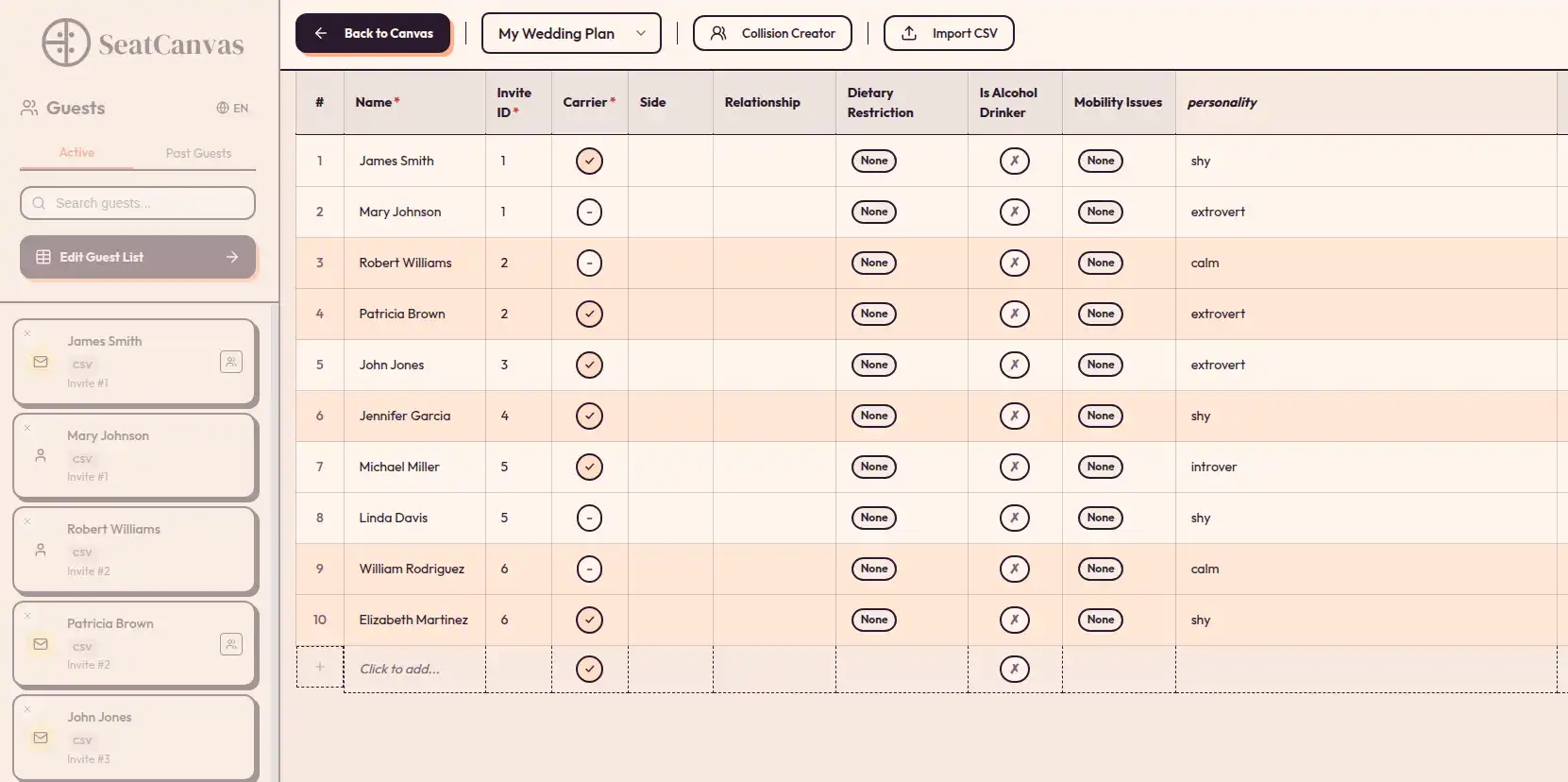
The SeatCanvas import wizard is built around this exact pain. Drop the file, match the columns, confirm, done. Plus-ones come through as their own seats. Dietary flags come through as notes you can search later.
Exports the venue will accept
The seating chart is not for you. It is for the caterer who needs meal counts by table, the venue coordinator who needs a layout, and the day-of helper who needs an escort card list.
A tool that locks PDF export behind a higher tier is useless to a budget wedding. The PDF is the whole point.
High-quality PDF and PNG exports at print resolution should be table stakes, not an upsell.
The short list for budget weddings
These are the tools that come up most for couples planning carefully, with an honest read on each.
SeatCanvas
Best for: couples planning one wedding who want the seating chart finished without a subscription.
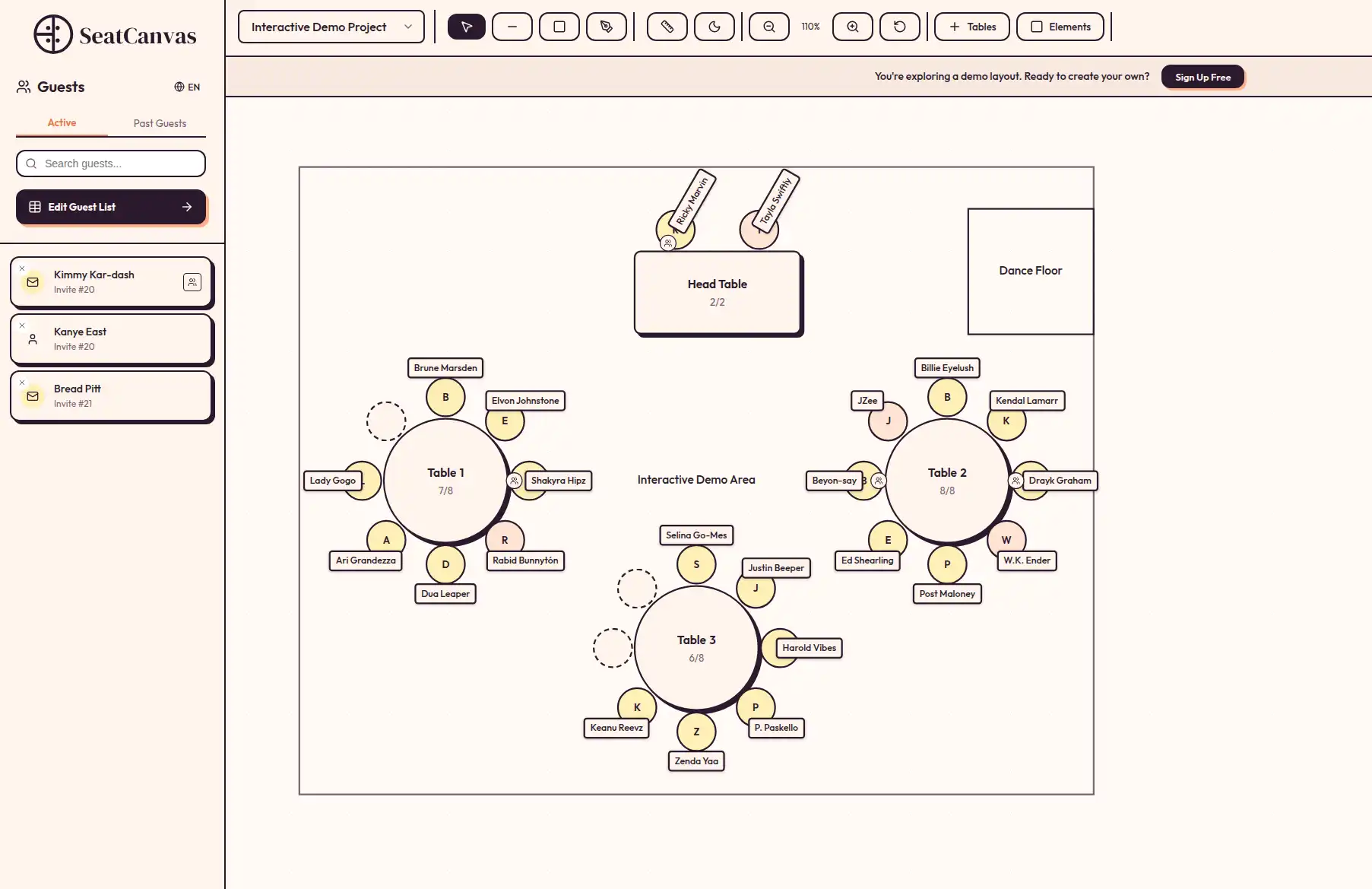
Free up to 40 seated guests, $19.99 one-time for unlimited. Full canvas, full import, full export at every tier. No annual renewal, no recurring charges. SeatCanvas is an online seating chart maker — no software to install, just open a browser tab and start dragging tables. The drag and drop seating planner is the product itself — guests and tables move as objects, and nothing has to be redrawn.
The honest limitation: SeatCanvas is built for one event at a time. If you are running 14 weddings a year, this is the wrong shape of tool. If you are planning your wedding, it is the right one.
Spreadsheets (Excel, Google Sheets, Airtable)
Best for: weddings under 25 guests where the seating chart is “table 1 and table 2.”
Free, universally available, and the worst possible tool for spatial reasoning. A spreadsheet does not show you that grandma is seated next to the speakers. It shows you that grandma is in row 47.
If your wedding is genuinely tiny and the venue layout is one room with two tables, a spreadsheet is fine. Past that, you are building a CRM out of cells, and the time cost dwarfs $19.99.
Canva, Google Slides, PowerPoint
Best for: a poster of the seating chart, after you have already designed it somewhere else.
These are design tools, not planning tools. They will let you draw 22 rectangles and label them. They will not let you swap two guests without dragging text boxes and praying nothing snaps to the wrong grid.
I keep seeing budget couples reach for these because they already know how to use them. The shortcut costs more than it saves. See the Canva seating chart alternative breakdown for the long version.
The Knot, Zola, WeddingWire seating tools
Best for: couples already deeply invested in one of these planning ecosystems.
These platforms include a seating tool because they have to, not because seating is their craft. The tools work for very small weddings and start showing limits past 60 guests. If your overall planner already lives here, the friction is low. If not, do not sign up for a full planning suite for the seating chart alone — it is a different shape of tool than what you need. If WeddingWire is the suite you already live in, the WeddingWire seating chart comparison covers that one.
Generic “free seating chart maker” sites
Best for: nothing, mostly.
The category is full of sites that look generous until you click export. Most are subscription tools wearing a free-tier costume. A few are real. Vetting them takes longer than just paying $19.99 for a tool that publishes its pricing on the homepage.
If you want the long-form comparison of which “free” tools are real and which are bait, the free seating chart maker post covers the field.
How to budget the seating chart in your wedding plan
The seating chart is not the place to overspend. It is also not the place to “save” twenty dollars by donating six hours of your week to a free tool fight.
Here is the budget allocation that works:
Seating chart tool: $0 to $19.99. Zero if your guest count fits a free tier. $19.99 if it does not. There is no scenario where a budget wedding should be paying more than that for the seating piece alone.
Vendor copies: $0. The PDF and PNG exports should be included, not extra.
Printing: $0 to $30. A printed escort card display at home is roughly $15 in cardstock and ink. A printed venue floor plan is one black-and-white page. The printing costs are real but small.
Time budget: 4 to 6 hours total. Two hours for the first draft, one hour after RSVPs settle, one hour the week of for late confirmations. A tool that pushes that past 12 hours is, in real terms, costing you more than $19.99.
The single biggest budget mistake I see is couples who refuse to spend $19.99 on a one-time seating tool, then spend an entire Saturday fighting a free one. The dollar cost is lower. The total cost is higher.
When “free” becomes expensive: a real cost comparison
Three real scenarios. Roughly the same wedding. Different tooling choices.
Scenario 1: 35-guest backyard wedding on the SeatCanvas free tier. Cost: $0. Tool has full export, full import, full canvas. The 40-guest cap is never hit. This is what a real free tier looks like.
Scenario 2: 110-guest wedding on a subscription tool advertised as free. Cost: $25/month for 5 months of active planning = $125. Plus a forgotten cancel that runs the bill to $175 before being noticed. Plus the 90 minutes spent calling support to get the post-wedding charge refunded.
Scenario 3: 110-guest wedding on the SeatCanvas Event Pass. Cost: $19.99 one-time. Tool stays available through the full planning window. No renewal, no surprise bill. The chart stays editable through the day before the wedding for the same single charge.
Scenario 1 is the right call if your guest count fits. Scenario 3 is the right call if it does not. Scenario 2 is what budget couples accidentally end up in when they let “free” do the choosing for them.
A short answer to the obvious objections
“Can’t I just use Excel?” For 12 guests, sure. For 80, you are reinventing the worst possible CAD program inside a spreadsheet. The seating chart needs spatial layout. Cells do not give you that.
“Why pay anything for a one-time event?” Because the alternative is donating an entire Saturday afternoon to fighting a free tool’s quirks. Time has a budget too. $19.99 against six hours of frustration is not a close call.
“What if I want to plan more than one event?” Most budget couples are planning one wedding. If you genuinely have two events back to back — say a rehearsal dinner the night before — the same Event Pass covers both as long as they live inside one project. If you are planning a wedding plus a totally separate corporate offsite later in the year, that is two passes, not a subscription. The offsite has its own playbook — the event seating chart maker guide covers sponsor tables, AV and meal counts.
“Are the free options actually safe to commit my data to?” Sometimes. Read the fine print on what happens to your saved chart when the trial ends. A real free tier keeps your work accessible. A trial converts your work into a hostage. The difference shows up around day 14.
Common questions
What is the cheapest way to make a wedding seating chart?
For weddings under 40 guests, SeatCanvas is genuinely free with full canvas, import, and export. Past 40, the Event Pass is a one-time $19.99. There is no cheaper credible path that does not also cost you a weekend in a spreadsheet.
Do I have to pay for a wedding seating chart tool?
Not for small weddings. Past 40 to 50 guests, you either pay once or pay monthly. For a single wedding, the one-time pass is almost always cheaper than a subscription you will forget to cancel.
Are free seating chart makers actually free?
A few are, up to a real cap. Most use “free” as a loss leader for a monthly subscription that activates the moment you try to export a printable PDF or seat your full guest count. Verify the export and the guest cap before committing.
Is a one-time $19.99 seating chart tool worth it for one wedding?
Yes, almost always. The hidden cost of a free tool is the hours you spend fighting its limits the week of the wedding. A $19.99 charge that makes the chart actually finishable is the rare wedding line item that pays for itself in time alone.
What about doing it on paper?
Paper works for 20 guests at one round table. Past that, you are erasing a lot. Every late RSVP forces a redraw. Digital is not luxury here — it is the cheaper option once the guest count crosses 40.
A wedding on a budget is a discipline, not a deprivation. You skip the things that do not show up in your memory of the day, and you spend on the things that do. The seating chart is squarely in the first category. It should cost you twenty dollars or less, take an afternoon, and never become a story you tell about your wedding.
If you want to test the math, open SeatCanvas with your current RSVP list. The first 40 guests are free. If your wedding is bigger than that, the one-time $19.99 is the entire bill, and the chart is finished by dinner.
✦ Google Preferred Source
Want to see more SeatCanvas stories on Google?
You can ask Google to show SeatCanvas more often in your own Top Stories and supported Google experiences. This personalizes your account; it does not raise SeatCanvas for everyone.
Google's control loads only after you choose Continue with Google.