

The standard wedding seating guide assumes two sets of in-laws and a tidy nuclear arrangement. A blended-family wedding does not have two sets of anything. It has four parent units, sometimes six, a stepsibling or two who grew up at the same kitchen table as the couple, half-siblings who may have only met at holidays, and grandparents on multiple sides who have different relationships to the room.
The chart is not harder because the family is broken. It is harder because the family is bigger and more interesting than the template was built for.
This is what works for actually seating a blended family at a wedding. The pattern, the tooling, and the small decisions that keep the room calm.
The short version: A blended-family wedding chart needs a planner that treats each parent unit — biological parent plus current partner — as one table near the head table, lets you tag guests by parent unit and family branch, and re-exports the chart in minutes when a half-sibling or stepparent changes their RSVP. SeatCanvas does all three. Free under 40 guests, one-time $19.99 Event Pass past it. Anything that hard-codes one “parents table” or hides exports behind a subscription is the wrong shape.
Why blended-family weddings are a different problem from divorced-parent weddings
A wedding with divorced parents has its own seating chart logic — two parent tables placed symmetrically, a buffer table for stepfamily, and a careful avoidance of seating exes side by side.
A blended-family wedding can include all of that and one more layer. The new family unit is not just a workaround for the divorce. It is the actual family the couple grew up in. Mom remarried when the couple was six. The stepfather has been there for nineteen years. The stepsiblings shared a bunk bed with the bride from age eight onward. The half-sister born when the couple was twelve is genuinely the couple’s sister, not a footnote.
The chart has to reflect that.
Three things change once you accept “blended” as the operating model:
- There are usually three or four parent units, not two. Bride’s mom plus stepfather. Bride’s dad plus stepmother. Groom’s mom plus stepfather. Groom’s dad plus their current partner. Each unit deserves a table.
- Stepsiblings are siblings. If a stepsibling grew up in the household, they are not a guest of the parent. They are immediate family with their own placement decision.
- The head-table-adjacent ring is bigger. Two parent tables fits one circle of chairs around the head table. Four parent units plus a stepsibling table plus grandparents asks for a wider arc.
Tools that were built around the two-table assumption will fight you on every one of these.

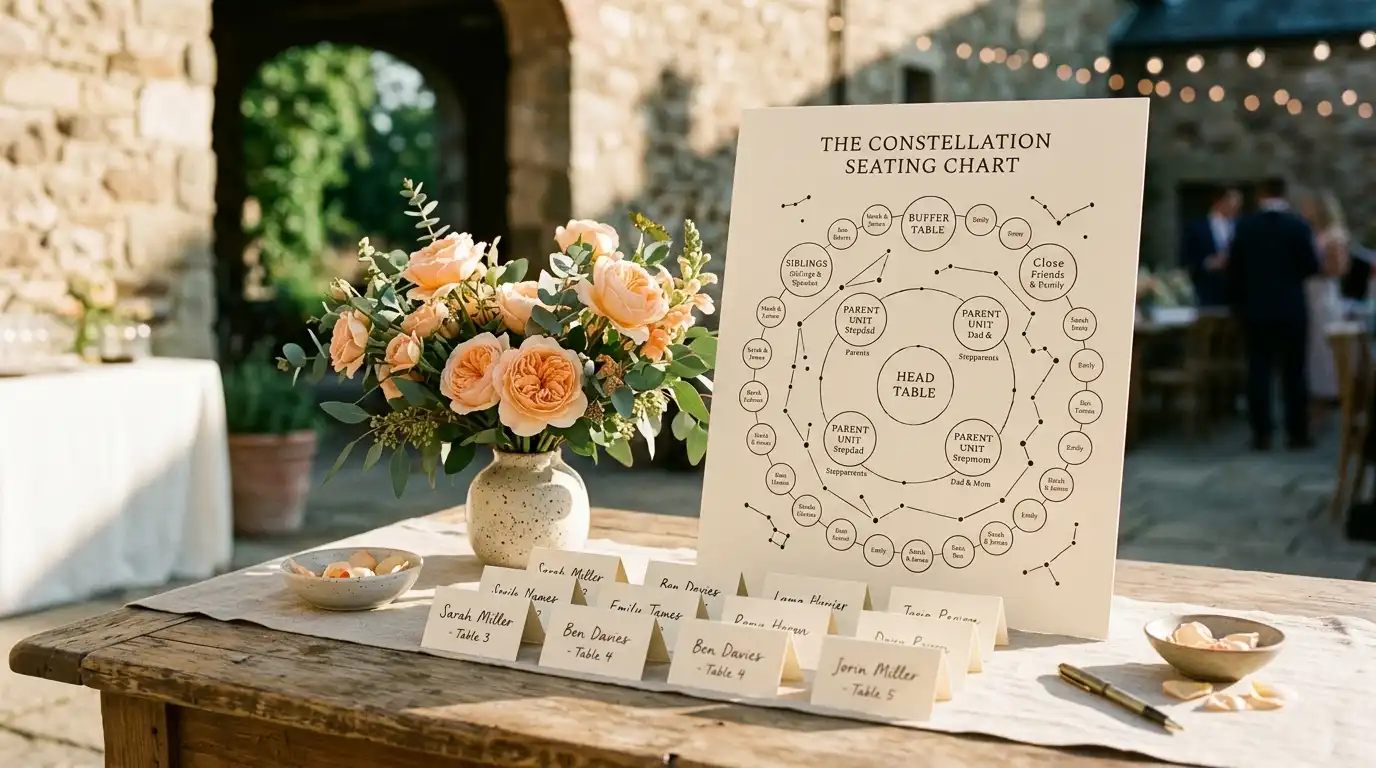
The constellation pattern: a working layout for blended families
Try SeatCanvas — Free
Build your seating chart visually. Import guests, drag to tables, export a print-ready PDF.
Start Planning Free →The four-table pattern for divorced parents scales up well, but blended families usually need an extra ring. Call this version the constellation pattern.
The center: head table or sweetheart table. Couple alone, or couple plus wedding party. Same as any wedding.
Inner ring: parent-unit tables. One table per parent unit. A parent unit is one biological parent plus their current partner — married, long-term, whatever. Two units becomes the standard divorced-parents layout. Three or four units becomes a constellation. Place them at equal radius from the head table. Equal distance reads as equal weight, which is the whole point.
Inner ring (second seat): the “raised them” exception. If a stepparent did the actual raising — was there from before age ten, paid for braces, drove to school plays — that stepparent sits at their partner’s parent-unit table, not at a separate “stepparents” table. The chart should match who the parents actually are.
Middle ring: siblings. A dedicated table for siblings, stepsiblings, and half-siblings, placed adjacent to the parent-unit tables. The sibling table is one of the most underrated tables in any wedding. For blended families it is where stepsiblings get the same visual placement as biological siblings, which is the right answer in almost every case.
Middle ring (alternate): individual sibling units. If the siblings are old enough that they each came with a partner, the sibling table can split into “sibling and partner” pairs at the next ring out. Less elegant, but sometimes the sibling table would have twelve people in two camps and that is too dense.
Outer ring: extended family and friends. Aunts, uncles, cousins, family friends, college friends, coworkers. The same arrangement as any wedding. Tags by family branch (bride mom side, bride dad side, groom mom side, groom dad side, couple’s friends) keep the room balanced.
Floating: the buffer table. A blended-family wedding usually needs at least one. The buffer holds guests who do not slot cleanly: a half-sibling who is closer to the family friends than to the rest of the siblings, a step-grandparent who is genuinely beloved but does not have a parent-unit table to sit at, a long-time family friend who is closer to multiple parent units than any one of them. The buffer table is not a demotion. It is the table that prevents anyone from getting jammed into the wrong seat.
The constellation pattern works because it scales. Two parent units, three parent units, four parent units — the structure stays recognizable. Symmetry around the couple stays intact. Nobody is the back-corner table.
What to look for in a wedding table planner for blended families
Most feature checklists are noise. For this kind of wedding, six things matter.
Guest tagging by parent unit AND family branch
Two layers of tags, not one. Every guest gets a parent unit tag (who they came in with — bride’s mom-unit, groom’s dad-unit, etc.) and a branch tag (which side of the family they connect through). A stepcousin might be groom’s-dad-unit on parent tag and groom-dad-branch on branch tag. The two layers let you balance the room two different ways.
SeatCanvas handles this through guest notes that flow in from the CSV/Excel guest list import. A “Parent Unit” column and a “Branch” column in your spreadsheet preserve through the import. If the column is not there, you can add it in two minutes and re-import.
Independent table placement, not template-locked
A real canvas where you place tables wherever the geometry of the room needs them. The constellation pattern asks for three to five tables in the front quarter of the room placed at equal radius from the head table. Templates that auto-fill a “parents table” and a “wedding party table” cannot do this. You need a drag-and-drop builder where each table is its own movable object.
Move whole tables without losing assignments
The single most important feature for blended families. The chart will move four to seven times before the wedding. Sometimes the parent units get reshuffled because a venue change forces a new room layout. Sometimes a stepsibling RSVPs late and the sibling table needs to shift back one row. The tool that lets you move a table as one object — guests intact, tags intact, dietary notes intact — is the tool that survives the planning year.
Filter the canvas by tag
Once you have tagged guests, you should be able to dim the canvas down to one parent unit at a time. Show me only the groom’s mom-unit. Is the room balanced? Are the bride’s mom-unit guests evenly distributed or all clustered on one side? A canvas with no tag filter is a canvas you cannot QA.
Re-export at print resolution, anytime
Blended-family charts change a lot. The first export happens six weeks out. The second happens after RSVP day. The third happens when the venue confirms the floor plan. The fourth happens when the stepfather’s mother — who never RSVPs to anything — finally confirms she is coming. Every one of those exports needs to be print quality. A tool that charges per export or hides PDF behind a paywall makes the chart cost-prohibitive to iterate. High-quality PDF and PNG exports at every tier is not a luxury for this audience. It is the operating mode.
Bilingual support if the family runs two languages
Many blended families include a partner whose family speaks Spanish, French, Mandarin, or anything else. The chart needs to print in whichever language the place cards are in. SeatCanvas runs in Spanish at /es end-to-end — canvas, planner, guest list, billing. The tildes and ñ render correctly in the export, which sounds obvious until you have seen what generic platforms do with Latin diacritics.

What to skip
Some tools that come up when you search for “wedding table planner for blended families” are not built for this scale of family. The category is full of bait.
Skip these:
- Auto-layout AI seating tools. They are trained on standard nuclear-family weddings. They will helpfully seat your bride’s mom next to her ex-husband’s new wife. You will spend ninety minutes undoing the suggestions.
- Tools that hard-code “parents” as one table. Generic wedding platforms often do this. If the platform’s table types include “head table,” “parents table,” and “wedding party table” with no “additional parent unit” option, the platform is the wrong shape.
- Tools that hide CSV import. Blended-family guest lists are usually 100 to 250 people. Typing 180 names twice (once for the spreadsheet, once for the planner) is unreasonable. The planner that imports your existing sheet saves three hours.
- Subscription seating chart tools without a one-time option. The wedding ends. The subscription does not. A one-time pass or a real free tier are the only viable pricing structures for a single-event tool.
- Generic floor plan and CAD tools. Architecture software draws round tables beautifully. It assigns guests to seats terribly. Use a planner, not a drafting tool.
For the long-form comparison of why design-only tools fail at this scale, see the Canva seating chart alternative breakdown.
How to build a blended-family seating chart, step by step
If you are starting from scratch on a blended-family wedding, this is the order I would follow.
Step one: map the parent units before opening the planner. On paper, write the parent units in a row: “Bride mom + stepdad,” “Bride dad + stepmom,” “Groom mom + stepdad,” “Groom dad + partner.” Add or subtract units to match the actual family. You will land on two, three, or four. The number sets the rest of the layout.
Step two: tag the guest list by parent unit in a spreadsheet. Add a “Parent Unit” column. Add a “Branch” column for which side they connect through. Spend twenty minutes here. It saves three hours later. Save the sheet as a CSV.
Step three: open the planner, place the head table. Center of the room. Lock the position.
Step four: place the parent-unit tables in a constellation. Two units becomes front-left and front-right. Three units becomes a curved arc at front. Four units becomes a wider arc, sometimes wrapping slightly toward the back of the head table. Equal radius from the head table is the rule. The visual statement of equal distance is what makes the chart read as fair.
Step five: place the sibling table. Adjacent to the parent-unit tables, slightly out from the head. This is where biological siblings, stepsiblings, half-siblings, and their plus-ones land. Treat the table as one unit.
Step six: add a buffer table. Somewhere in the middle ring, between the sibling table and the extended-family ring. The buffer holds anyone who does not fit cleanly. You will need it.
Step seven: import the tagged guest list. Run the CSV through the planner’s import. Verify that the Parent Unit and Branch columns came through. If they did not, add them as guest notes manually — fifteen minutes, not five hours.
Step eight: fill the parent-unit tables from the inside out. The parent and their partner first. Then closest immediate family — the parent’s parents (grandparents of the couple), siblings of the parent, longtime warm friends of that parent unit. Six to ten seats per table is the comfortable range. Resist the pressure to make every seat at the parent’s table a blood relative; warm family friends keep the table conversational.
Step nine: fill the sibling table. Biological siblings, stepsiblings, half-siblings, sometimes their partners. If the sibling table would exceed ten people, split it: “couple’s siblings + partners” at the inner ring, “stepsibling cousins and friends” at the next ring.
Step ten: fill the rest of the room with the canvas filtered by tag. Dim everyone except “bride mom-unit branch.” Look at the room. Is the side balanced? Add or move family-friend tables if the branch is underrepresented. Repeat for each branch. The filter is the QA pass.
Step eleven: re-export early and often. First export six weeks out, second after RSVP day, third after the final floor plan from the venue, fourth two days before the wedding for anyone reshuffled because of a last-minute change. Each export should take under two minutes; if it does not, the tool is the wrong tool.
The “raised them” rule
The single hardest decision in a blended-family seating chart is what to do when the legal parent and the actual parent are not the same person.
The bride’s biological father has been mostly absent since age six. The bride’s stepfather raised her. The stepfather signed the school forms, drove her to college, gave her advice in her twenties. The biological father is still invited. He still has a parent-unit table. But the placement question — who sits at the head table during the toasts, who walks her down the aisle, who gets the camera time during the parent dance — is real and uncomfortable.
The chart’s answer is straightforward: the seating placement should match who actually raised the couple, full stop.
If a stepparent did the raising, they get the head-table-adjacent placement. They sit at their partner’s parent-unit table. They get the same visual distance from the couple as a biological parent would. If the biological parent is also present, that parent still gets a parent-unit table — placed symmetrically, on the other side of the dance floor, with the same care for their seating as anyone else. The visual statement is “both are recognized,” not “one is ranked above the other.”
The chart cannot fix the underlying family dynamic. It can refuse to add to it. The couples I have watched make this call describe it as one of the most validating decisions of the planning year. The biological parent rarely complains about the placement; the stepparent rarely forgets the feeling of being seated where the actual parental role would have placed them all along.
When the family is large and the dance floor is small
Blended families tend to push the guest count up. Three or four parent units means three or four sets of grandparents, three or four sets of aunts and uncles, and a fuller cousin layer than a standard wedding has. A 90-guest wedding in a nuclear family becomes a 140-guest wedding in a blended one.
That sometimes runs into the venue’s actual capacity. Two practical principles for the room:
- Compress the outer ring, not the constellation. If the room is tight, the place to cut tables is the outer ring of friends and coworkers, not the parent-unit constellation. Cutting an aunt’s table to save space says “you matter less.” Cutting a coworker table says “I do not see you every week anyway.” Couples almost always cut the wrong ring on the first pass and have to redo it.
- Round tables for ten, not banquets for sixteen. Round tables let people see across the table, which matters when half the table is meeting the other half for the first time. Long banquets hide the far end and discourage cross-talk, which is the opposite of what a blended-family wedding needs.
For the longer treatment of seating larger weddings, see the 200+ guest seating chart playbook.
A short comparison of tools for blended-family weddings
Five categories of tool come up when couples planning a blended-family wedding start looking.
SeatCanvas
Best for: couples who want full control of table placement, two-layer tagging (parent unit and branch), and a tool that does not assume a nuclear family.
Free up to 40 seated guests with the full canvas and export set. One-time $19.99 Event Pass for unlimited seating past 40. Independent table shapes, full CSV import including custom columns, PDF and PNG exports at print resolution at every tier. No subscription that follows the couple home from the honeymoon.
The honest limitation: SeatCanvas is built for one event at a time. If you are also planning a baby shower and a corporate offsite this year, that is three Event Passes. For most couples planning one wedding, that is exactly the right shape. For couples on a tight budget, the free-tier playbook covers what fits under 40 seats.
The Knot, Zola, WeddingWire
Best for: couples already deep in one of these ecosystems for venues, registries, and websites.
The seating tools inside these platforms exist because they have to. They are rarely the platform’s strongest piece. The seating templates tend to assume one parents table and one head table; blended-family flexibility is shallow. For the head-to-head comparison see the Knot seating chart alternative writeup.
Generic AI seating generators
Best for: 20-person dinner parties, not 140-guest blended-family weddings.
The pitch is “tell it your constraints and it will seat the room.” The reality is that blended-family relationships do not compress into prompt language. The auto-layout will produce a chart that needs ninety minutes of corrections, which is roughly the same time it takes to place the constellation by hand. The full case is in the AI seating chart generator post.
Spreadsheets
Best for: tracking RSVPs, dietary notes, and the parent-unit and branch tags before they go into a real planner.
Spreadsheets cannot do spatial reasoning. The chart’s hardest question — is the room balanced — is a spatial question that lives on a canvas, not in a grid. Use the sheet for the data; use a planner for the layout.
Paper and pen
Best for: sketching the constellation pattern before opening any software.
Paper is honest. It is also brittle. The chart will be reshuffled four to seven times. Use paper for the first ten minutes; move to a real planner for everything after.
Three questions blended-family couples ask most often
“Do we have to call it a blended family?”
The chart does not need a label. It needs accurate placement. If the family functions as a blended unit, the chart should treat it that way. The word “blended” matters less than the structure of the parent-unit constellation.
“What if one stepparent and one biological parent do not get along?”
The constellation pattern keeps them at separate tables on different sides of the dance floor. The buffer table is between them spatially. They will not be forced into the same conversation. The chart’s job is not to resolve the relationship — it is to make sure the room does not put them in a forty-minute photograph standoff.
“How do we handle half-siblings who only know the couple from holidays?”
Two options. Seat them at the sibling table if the rest of the table is welcoming and the half-sibling is comfortable. Or place them at the buffer table or at the cousin table on their biological-parent’s side, where the social context is already familiar. Ask the half-sibling. The five-minute phone call beats every guess.
Common questions
How do you seat a blended family at a wedding?
Treat each parent unit — biological parent plus current partner — as one table. Place the units in a constellation around the head table, equal distance from the couple. Add a sibling table for biological siblings, stepsiblings, and half-siblings. Use a buffer table for anyone who does not fit cleanly. Tag every guest by parent unit and family branch so you can balance the room visually.
Are stepsiblings considered immediate family at a wedding?
If they grew up in the household, yes. Seat them at the sibling table or at the parent-unit table of the parent who raised both of them. If a stepsibling came into the family later in adulthood, they are still family, but the seating placement can move out one ring without anyone reading it as a slight.
What is the best wedding table planner for blended families?
A planner that lets you tag every guest by parent unit and family branch, place independent table shapes anywhere in the room, and re-export quickly when something changes. SeatCanvas does all three. Free up to 40 seated guests, one-time $19.99 Event Pass for larger weddings.
Should a stepparent who raised the couple sit at the head table?
Yes, if the head table includes parents at all. The seating chart should reflect who actually raised the couple, not who is on the birth certificate. Same table, same row, same camera distance as the biological parent.
Can a half-sibling sit at the parent-unit table of the parent they share?
Yes, and often that is the right answer. The half-sibling fits naturally next to their full biological parent. Their other parent — who is unrelated to the couple — sits with them at that same table as their partner. The parent-unit definition holds.
How many parent tables does a blended-family wedding need?
Usually three or four. Two if both biological parents are remarried and the partners come along. Four if both biological parents and all of their current partners count as one unit each. The number is the number; do not force it down to “two parent tables” to match a template.
A blended-family wedding is not a logistics problem. It is a family question with a seating chart attached. The chart’s only job is to make the room read as one whole family, not as a forced merger of two.
The constellation pattern does most of the work. A tool that lets you place independent tables, tag guests by parent unit and family branch, and re-export without ceremony does the rest. That is enough.
If you want to test the layout, open SeatCanvas with your current guest list and try the constellation pattern. The first 40 guests are free. If the wedding is larger — and blended-family weddings often are — the one-time $19.99 Event Pass covers the entire planning window. No subscription, no per-export fee, no template fighting you on which parent gets a table.
✦ Google Preferred Source
Want to see more SeatCanvas stories on Google?
You can ask Google to show SeatCanvas more often in your own Top Stories and supported Google experiences. This personalizes your account; it does not raise SeatCanvas for everyone.
Google's control loads only after you choose Continue with Google.