

Being a DIY bride means you already do everything. You designed the invitations in Canva, you negotiated the caterer down yourself, you are working out how much alcohol to buy, and you are assembling 120 centerpieces in your living room. You did not hire a planner because you wanted the control and you wanted to keep the money. And then you hit the seating chart, and suddenly every tool wants a monthly subscription or assumes a coordinator is going to hand you a diagram.
There is no coordinator. There is you, a guest list, and a venue floor plan you sketched on the back of the contract.
So the question is not “what is the fanciest seating tool.” It is “what tool respects that I am doing this myself, on a budget, and I want to be done by midnight.” Here is the honest answer for a DIY bride, plus the trap most people fall into and the order I would build it in.
The short version: A DIY bride wants three things from a seating planner — it has to be cheap or free, it has to be visual so she can actually see the room, and it cannot fight her. SeatCanvas opens to a blank canvas, imports your guest list from the spreadsheet you already keep, and lets you drag names onto tables. It seats 40 guests free with full export, no account required to start. Past 40, it is $19.99 one-time, not a subscription. Build the room, import the list, assign the tables, print the PDF. Done in an evening.

What “DIY” actually changes about the tool you need
A bride with a full-service planner gets a seating chart handed to her. Somebody else owns the software, owns the floor plan, owns the headache. You are not that bride. Doing it yourself changes the requirements in three concrete ways.
You are paying with your own money, for one event. A subscription is the wrong shape for a thing you build once. Wedding seating is not a recurring job. You need it for a few weeks, you print it, you never open it again. Paying a subscription every month — and remembering to cancel before the next charge hits in the middle of your honeymoon — is a tax on doing it yourself.
You are paying with your own time, and you have none. Between the dress fittings and the vendor emails, the seating chart is the task you keep pushing to next weekend. The tool cannot have a learning curve. If it takes an hour to figure out the interface, that is an hour you do not have.
Nobody is checking your work. A planner catches the problem where you sat your divorced parents at the same table. You are your own quality control. That is exactly why a visual chart beats a list — you can see the mistake before it becomes a scene at the reception.
So the shortlist is short: cheap, fast, visual. Most tools fail at least one.
The spreadsheet trap
Try SeatCanvas — Free
Build your seating chart visually. Import guests, drag to tables, export a print-ready PDF.
Start Planning Free →Almost every DIY bride starts in a spreadsheet, and that is the right place to start. Your guest list belongs in a spreadsheet — names, RSVPs, meal choices, plus-ones, the column where you track who has not replied. Keep it there.
The trap is trying to seat people in the spreadsheet too. You make a tab called “Tables,” you type “Table 1: Mom, Dad, Aunt Carol…” and within twenty minutes you have a wall of text that describes a room you cannot picture. Is Table 4 too close to the speakers? Does the head table have enough seats? Is Uncle Rob’s wheelchair going to fit down that aisle? A spreadsheet cannot answer any of that, because a spreadsheet is not a room. It is a list pretending to be a room.
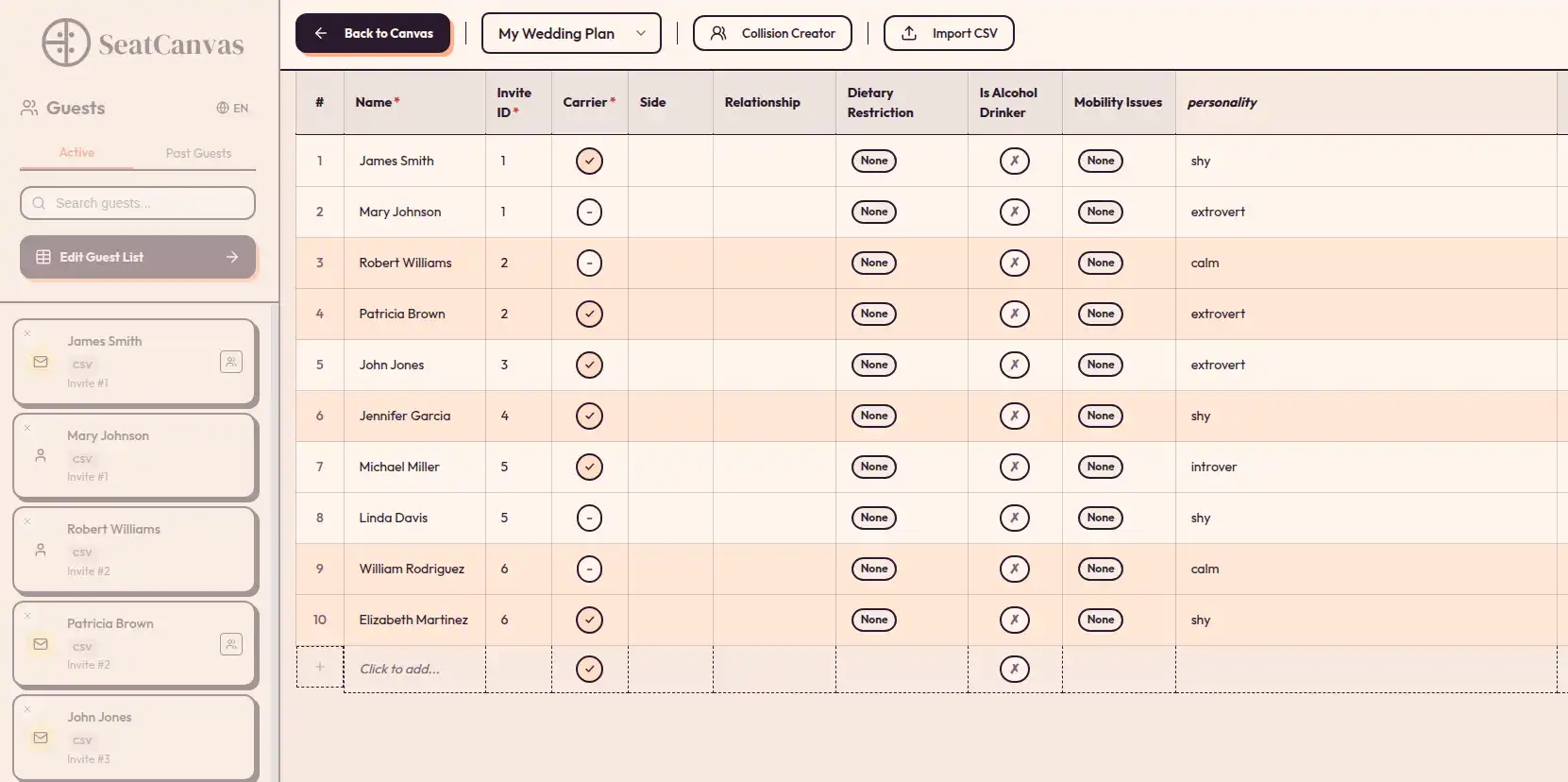
The fix is not to abandon the spreadsheet. The fix is to import it. Keep your list where it lives, then pull it into something that draws the actual floor. SeatCanvas has a CSV and Excel import that maps your columns — name, side, meal, plus-one — and brings every guest in as a seat you can move. Your spreadsheet work is not wasted. It becomes the foundation.
What to look for in a DIY seating planner
Judged against the cheap-fast-visual test, here is what actually matters and what is noise.
A blank canvas that matches your real venue
Your reception is not a stock ballroom. It is your aunt’s backyard, or the back room of a restaurant, or a barn with a weird L-shaped layout. A tool that starts you in a pre-drawn template fights you immediately, because your room is not that room.
You want a planner that opens empty and lets you draw what you actually have. SeatCanvas opens to a blank canvas. You place round tables, rectangular tables, a head table, the dance floor, the gift table — wherever they really go. The L-shaped barn becomes an L-shaped chart, not a rectangle you have to mentally translate all night.
Drag-and-drop, because you will change your mind
You will redo this chart. A guest will RSVP late, a couple will break up two weeks out, your grandmother will request to be moved away from the band. A DIY chart is never built once. The whole point of a visual tool is that moving a guest is dragging a name, not retyping a paragraph and renumbering everything after it.
Real export you can hand off
Even doing it yourself, you have handoffs. The caterer needs meal counts by table. Whoever is setting up needs a diagram. You need escort cards or a big printed chart for the entrance. SeatCanvas does high-quality PDF and PNG export plus a CSV of the guest-to-table mapping. One clean file you can text to the caterer, one you can print at the library for two dollars. No design software, no watermark.
A free tier that is actually usable
A lot of “free” seating tools are a demo with a paywall the second it gets useful. SeatCanvas seats 40 guests free with every feature on — the full canvas, import, and export, not a crippled preview. For an intimate wedding, that is the whole event for zero dollars. If your list runs bigger, the Event Pass is $19.99 one-time and the cap comes off. That is less than the cost of one centerpiece.
The honest comparison for a DIY bride
Quick reads on what DIY brides actually reach for, judged on cheap, fast, and visual.
SeatCanvas. Cheap (free to 40, then $19.99 once), fast (import the list, drag the names), visual (real floor plan). Built for the person doing the work. The honest limitation: it plans the seating, it does not plan the whole wedding. It will not track your budget or your vendor contacts. It does the chart, and only the chart, which is the point.
Pen and paper. Free and tactile, and genuinely fine for a 25-guest dinner with two tables. The break point is revision. Your third reshuffle turns the page into an eraser smudge, and a paper chart cannot import the spreadsheet you already built. Past a couple of tables, it costs you more time than it saves in money.
A spreadsheet. Already covered — perfect for the list, wrong for the seating. Use it for what it is good at and import it into the visual layer.
The Knot, Zola, WeddingWire seating tools. Real, free if you are already living inside their planning suite, and worth using if you are. But they assume the full-platform world, and the seating modules lean on fixed room templates. If you are a DIY bride who picked your own tools on purpose, do not adopt an entire wedding-planning ecosystem just to get a chart. The Knot seating alternative breakdown covers the trade-offs.
Subscription design apps. You can absolutely build a chart in a general design tool you are already paying for. But you are drawing every table from scratch with no guest-list import and no meal-count export, which is a lot of manual work for a one-time job. The Canva seating chart comparison walks through where that falls down.
The DIY playbook: build it in one evening
This assumes your guest list is already in a spreadsheet and you know your venue. Pour the wine, put on a show you have seen before, and work it in order.
Get your floor plan in front of you. A sketch is fine. You need to know roughly how many tables fit and where the fixed things are — the dance floor, the bar, the entrance, the head table. If your venue gave you a diagram, even better.
Open the canvas and draw the room. Go to the SeatCanvas planner. Drop your tables where they really go. Rounds for most guests, a long head table or sweetheart table for you two, rectangles where the space is tight. Block out the dance floor and the bar so you are placing tables in the space that is actually left.
Import your guest list. Drop in your CSV or Excel file, map the columns, confirm. Plus-ones come in as their own seats. This is the step that pays for itself — a 100-row list that would take an hour to retype lands in a couple of minutes, and every name you already cleaned up in the spreadsheet carries over.
Assign the tables. Family first, both sides, closest to the head table. Then the friend clusters — the college group, the work people, the neighbors. Then the hard ones: the plus-one who knows nobody (seat them next to your most outgoing friend, never next to another stranger), and the family members who should be a few tables apart. Seeing it laid out is when you catch the problem a list would have hidden.
Export and print. PDF for the caterer with the meal counts. A big version printed for the entrance, or a CSV you turn into escort cards. Save the project so when your last three RSVPs straggle in, you open it, drag them in, and re-export in five minutes.
If you want a fuller walkthrough of the seating logic itself, how to create a wedding seating chart goes deeper on the assignment strategy, and if your wedding is coming up fast, the last-minute seating guide is built for a tight runway.

What to skip, because DIY means knowing when to stop
The DIY instinct is to do everything thoroughly. With the seating chart, three things look thorough and are actually just procrastination.
Drawing the venue to scale. You are making a seating plan, not an architectural survey. Tables roughly where they go, the dance floor and bar marked, aisles wide enough to walk. Nobody at the wedding will measure your chart against the room. An hour spent getting the exact dimensions of the gift table is an hour stolen from the actual assignments.
Color-coding everything. Color is useful when the caterer needs three meal options flagged across 15 tables. It is decoration when you have one menu and 50 guests. Reach for it only when the size of the event earns it.
Waiting for every single RSVP. You will have three people who never reply until you call them the week of. Do not let those three hold the entire chart hostage. Build it now with everyone who has answered, leave a little slack, and drag the stragglers in when they finally text back. That is the whole reason you used a tool that makes changes easy.
A DIY seating chart is a real room drawn once, a guest list imported once, and a PDF you can re-export whenever someone changes their mind. Everything past that is you avoiding the part where you actually have to decide who sits with your cousin.
Common questions
What is the best seating chart planner for a DIY bride?
SeatCanvas. It is built for the person doing the work herself, not for a planner you are paying by the hour. You open a blank canvas, draw your real room, import your guest list from a spreadsheet, and drag names onto tables. The free tier seats 40 guests with the full canvas, CSV import, and PDF, PNG, and CSV export. Past 40, the Event Pass is $19.99 one-time, with no subscription and no watermark on the chart you print.
Can I make my own wedding seating chart for free?
Yes. SeatCanvas seats up to 40 guests free with every feature unlocked, and you can test it without making an account. That covers a real intimate wedding end to end. If your list runs past 40, the one-time $19.99 Event Pass lifts the cap. A DIY bride with a 35-guest backyard wedding never has to pay anything.
Is a spreadsheet good enough for a DIY wedding seating chart?
A spreadsheet is great for the guest list and terrible for the seating chart. A grid of cells cannot show you who is sitting back to back across an aisle or which round table is one seat short. You end up describing a room in text. Keep the spreadsheet for names and RSVPs, then import it into a visual planner so you can actually see the layout before you commit to it.
How long does it take a DIY bride to build a seating chart?
For a 100-guest wedding, a focused evening. Importing the guest list from a spreadsheet takes a couple of minutes instead of an hour of typing. Drawing the room and placing tables takes maybe twenty minutes. The assignments are the slow part, and that is real decision-making no tool can rush. Budget one sitting to build it and a shorter pass after the last RSVPs land.
Do I need to download software to plan my own seating chart?
No. SeatCanvas runs in the browser, so there is nothing to install and it works the same on a laptop or a tablet. A DIY bride planning at the kitchen table one night and on the couch the next does not want a desktop install tied to one machine. Sign in with Google or Microsoft to save to the cloud and pick the chart back up anywhere.
You already did the hard, hands-on parts of this wedding yourself. The seating chart is not the thing that finally requires hiring help or paying a subscription — it is the thing a good free tool should just hand you. Draw your room, import the list you already built, drag the names where they go, print the PDF.
Open SeatCanvas and start with your real venue. The first 40 seats are free, no account needed. If your wedding runs bigger, the Event Pass is $19.99 one-time — once, for the one event you are building it for. Exactly the deal a DIY bride was looking for.
✦ Google Preferred Source
Want to see more SeatCanvas stories on Google?
You can ask Google to show SeatCanvas more often in your own Top Stories and supported Google experiences. This personalizes your account; it does not raise SeatCanvas for everyone.
Google's control loads only after you choose Continue with Google.